
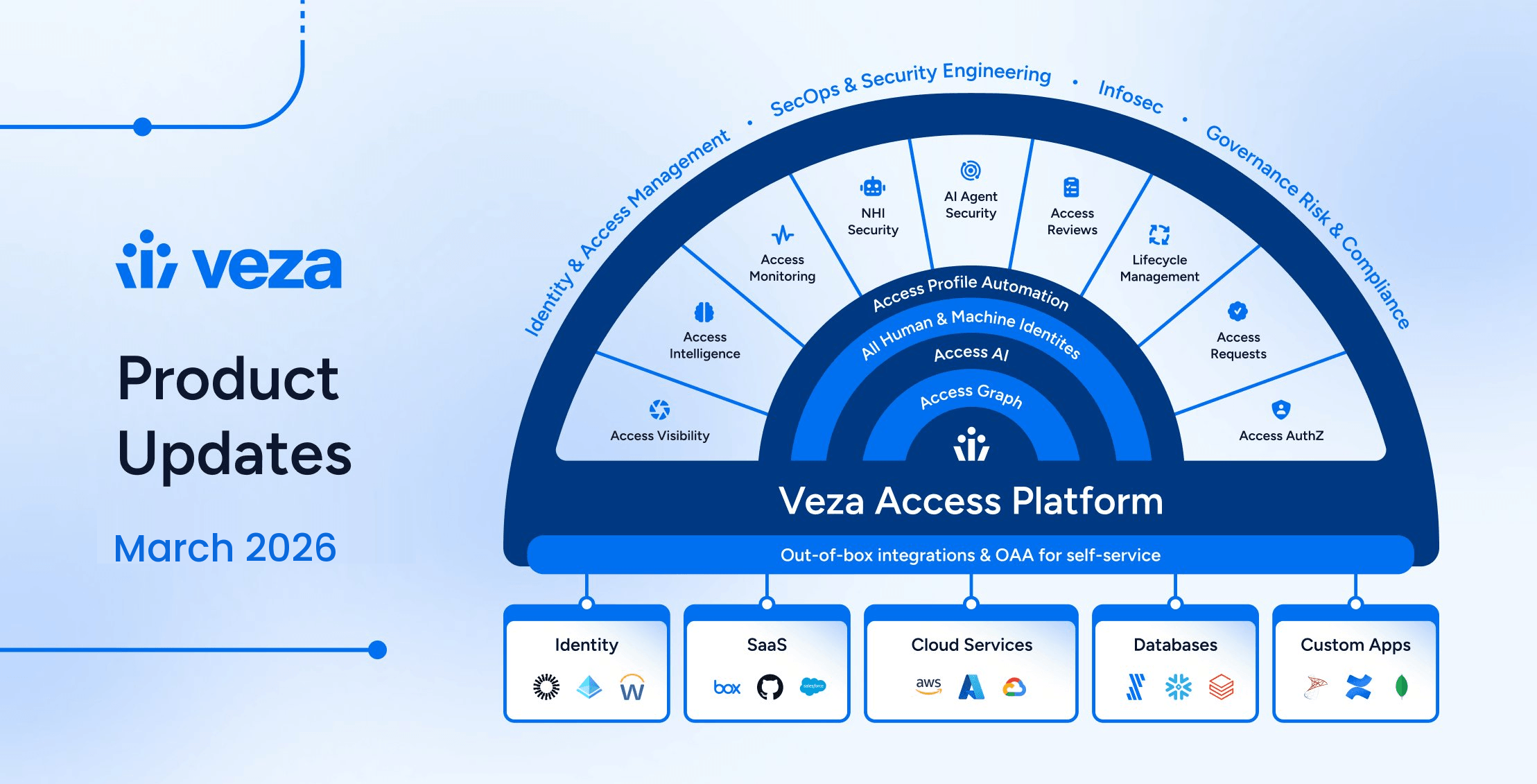
We’re excited to present the latest product updates for the 2026.3 release. Veza engineering, product, and design teams have worked to introduce features and enhancements across Access Intelligence, NHI & AI Agent Security, Access Reviews, and Lifecycle Management. We’ve also added new integrations for UiPath and Google Artifact Registry, and hardened existing integrations to support a growing range of enterprise environments.
Veza 2026.3 advances enforcement across the platform — enabling security teams to remediate risk directly from query results, giving IGA teams granular control over mover and leaver workflows, and expanding governance to on-premises directories and AI agent infrastructure.
New capabilities include:
- Veza Integrations: New integrations for UiPath & Google Artifact Registry; custom identity mapping for Privacera; Azure user-to-Resource Group visibility; database user authentication type attributes; in-app certificate and key pair generation for SharePoint Online and Okta; Cassandra v4.1 support; Workday Security Group inheritance visibility; UKG Pro custom property ingestion; OAuth2 authentication for ServiceNow Veza Actions.
- Access Intelligence: A new Disable Account action is now available in Early Access, enabling direct account remediation from query results without leaving Veza.
- NHI Security: Azure Key Vault Keys in the Veza graph now include key type and key strength attributes, helping identify and remediate weak or legacy keys (e.g., RSA 2048) that don’t meet modern organizational or regulatory (NIST, SOC2) minimums.
- AI Agent Security: Veza now automatically identifies Model Context Protocol (MCP) servers hosted on AWS Lambda and EC2 during data extraction, enabling visibility into AI toolchain and “shadow AI” infrastructure.
- V1 Management APIs: New public endpoints for Enrichment Rules management, async query execution, NHI Agents, and entity owner assignment.
- Lifecycle Management: Selective entitlement removal for granular mover and leaver control; workflow save conflict detection for multi-administrator environments; LDAP directories now supported as both identity sources and provisioning targets.
Please see the sections below for details on each product area, and contact your Veza representative with questions or feedback.
Veza Integrations
New Integrations
UiPath: Veza now integrates with UiPath Automation Cloud to discover users, robots, roles, folders, processes, assets, and queues across the automation platform.
- The integration uses UiPath’s folder-based access control model to map users to roles within specific folders and capture permissions over robots, processes, assets, and queues.
Google Artifact Registry: The Google Cloud integration now supports Artifact Registry, providing visibility into repository access across Docker, Maven, npm, Python, and other package formats.
- Veza now discovers Artifact Registry services, repositories, packages, IAM policies, and role bindings, enabling access queries across GCP artifact infrastructure.
Enhancements
Privacera Custom Identity Mapping: Custom Identity Mapping configurations now support Privacera as a destination datasource type, including both PrivaceraUser and PrivaceraPortalUser entities. This change enables organizations using Privacera for data governance to map identities between their IdP and Privacera to resolve cross-service user relationships in the Access Graph.
Error message visibility for data sources and workers: The All Data Sources page, Datasource tab, Worker tab, and Active Jobs tab now include an Error Message column, surfacing error descriptions without requiring administrators to open each data source individually.
Azure user-to-Resource Group visibility: The Azure integration now maps users to Resource Groups in the Access Graph, enabling access queries and reviews scoped to Resource Group permissions.
Database user authentication type attributes: User entities across Veza database integrations now include authentication type attributes, enabling queries and access reviews that filter by authentication method.
- MySQL integrations now include the local user “Authentication Plugin” attribute to identify the active auth plugin, for example, caching_sha2_password or AWSAuthenticationPlugin.
- PostgreSQL and Oracle expose the user “Authentication Type” with possible settings including iam, SCRAM-SHA-256, and PASSWORD.
- Cassandra role entities now include a “Has Password” boolean indicating whether the role requires password authentication.
- MongoDB shows user “Authentication Mechanisms” as a list, with possible values including SCRAM-SHA-256, SCRAM-SHA-1, X.509 certificate (MONGODB-X509), and Kerberos (GSSAPI).
- AWS DocumentDB always returns SCRAM-SHA-1(TLS) as the mechanism, reflecting the single supported authentication method.
UKG Pro Custom Properties: The UKG Pro integration can now discover organizationally-defined custom properties alongside standard employee attributes.
ServiceNow Veza Actions OAuth2 Authentication: Veza Actions configured to create tickets in ServiceNow can now use OAuth2 authentication (in addition to basic authentication).
In-app certificate and key pair generation: When configuring integrations that require an X.509 certificate or private key for app-only authentication, administrators can now generate the certificate or key pair directly in the Veza UI, without requiring OpenSSL or other external tooling for SharePoint and Okta.
Cassandra v4.1 Permission Support: The Cassandra integration now supports Update and Truncate permissions introduced in Cassandra v4.1.Organizations running Cassandra 4.1 or later will now see complete permission coverage across all supported CQL operation types.
Delinea Secret Server OAuth2 Client Credentials (Early Access): The Delinea Secret Server integration now supports OAuth2 client_credentials as an alternative authentication method.
Workday Security Group Inheritance Visibility: Workday Security Group Binding entities now have an IsInherited property, distinguishing between security group memberships that are directly assigned and those inherited from a parent organization in the Workday hierarchy. An “Is Inherited” property is now available on Workday Security Group Binding entities. This attribute can be used to exclude inherited bindings when reviewing account-to-organization access paths, focusing instead on directly-granted security group relationships.
Access Intelligence
New Features
Disable Accounts (Early Access): Access Intelligence now supports disabling user accounts directly from query results. When a query surfaces risky accounts, such as those belonging to departed employees or flagged by a dormancy policy, administrators can select accounts and disable them without leaving Veza.
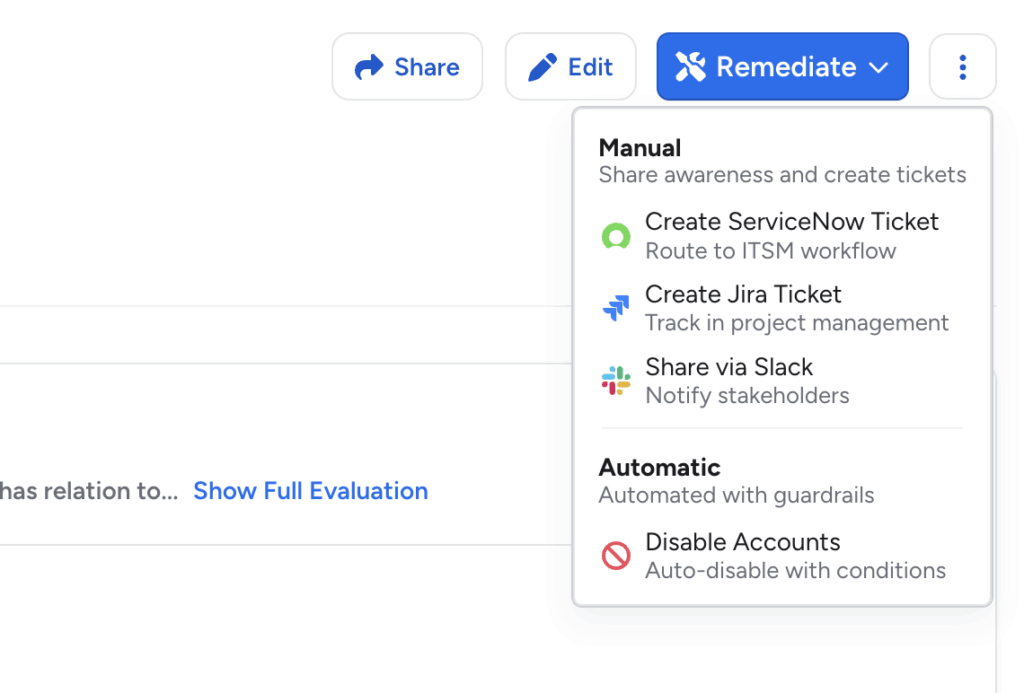
The action creates an auditable access request record, and the results are visible in a new Remediation Log on the query details page.
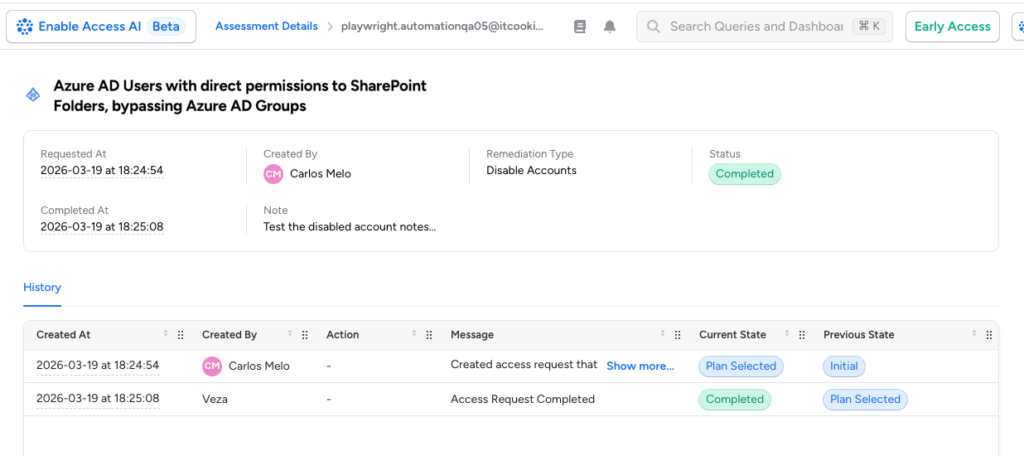
- The Disable Accounts option appears under the Remediate dropdown on a query details page. Selecting it opens a full-screen workflow to preview affected accounts, add a note documenting the reason, and confirm execution.
- Requires Provisioning to be enabled for the target integration and the query to be configured for the Disable Accounts action. This action currently supports a limited set of target integrations: Okta, Active Directory, and Azure AD.
This feature is in Early Access. Contact Veza support to enable it for your tenant.
Enhancements
Veza Tags via Enrichment Rules: Enrichment rules now support a Veza Tags rule type, enabling bulk tagging of entities directly from the Veza UI.
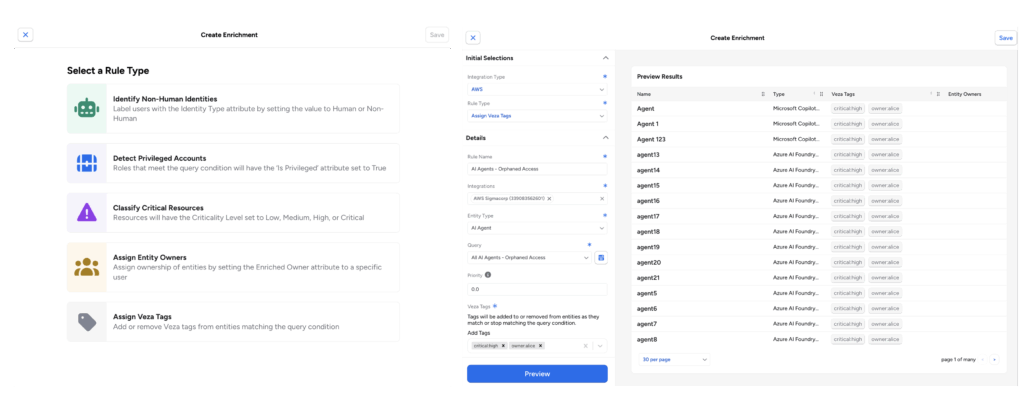
Previously, applying tags at scale required the Tags API. The new rule type follows the same configuration flow as other enrichment rules (specify the source query, add a Veza Tags action, and configure the tag values to apply). For configuration details, see the Enrichment Rules documentation.
Dashboard Cloning: Dashboards can now be cloned directly from the Dashboard Library actions menu, or from the header menu (⋮) above any dashboard.
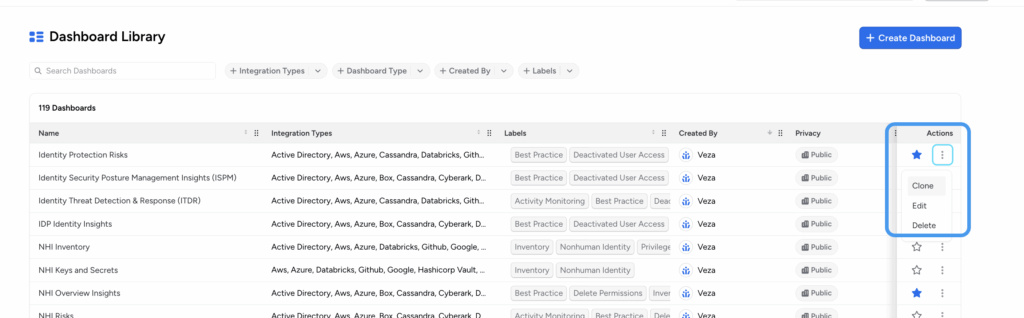
- Cloning creates an editable copy that includes all sections and queries, allowing you to customize or experiment with the dashboard without modifying the original.
- Cloned dashboards are automatically named “Copy of [original name]” and owned by the user who performed the clone. Cloning requires a role with permission to create dashboards.
- Clones do not inherit the original dashboard’s sharing settings. The clone is owned solely by the user who performed the clone, and is not shared with any teams or users (even if the original dashboard was shared).
Save and Notify Team: When saving a dashboard, a confirmation modal now provides two options for controlling how the save is surfaced to teammates:
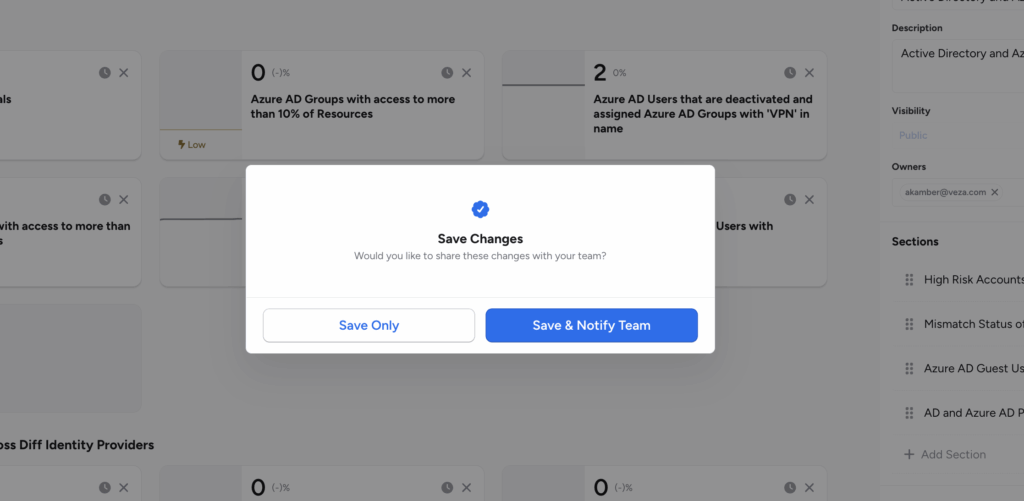
- Save Only: Saves the dashboard. Public dashboards are available to your team, but will not appear in the New from Team section under Favorites.
- Save and Notify Team: Saves the dashboard and notifies teammates. Published dashboards appear in teammates’ New from Team section under Favorites, making it easier to surface newly updated dashboards to the right audience. The Save and Notify Team option requires the dashboard to have Public visibility.
Remediation Ticket Title: When creating tickets through the Remediate modal in Query Details or Dashboards, you can now optionally provide a title.
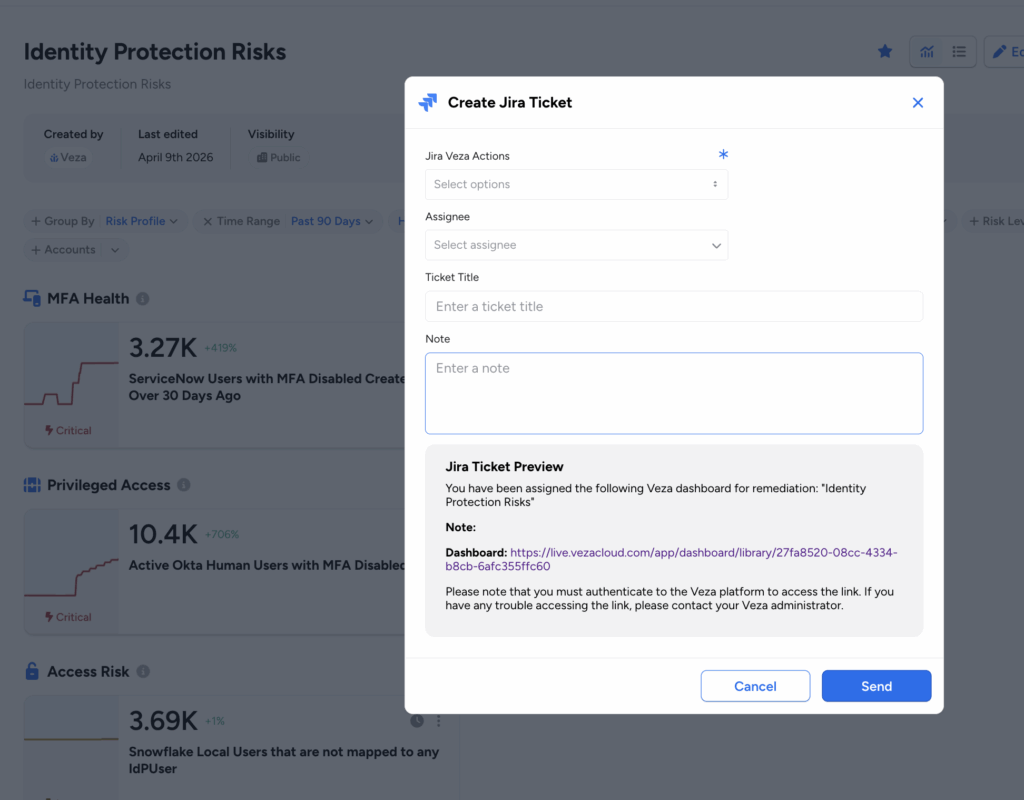
- The title appears as the short description in ServiceNow tickets and as the ticket title in Jira tickets. If no title is provided, the field is left blank.
- This allows teams to include context-specific descriptions in remediation tickets without manually updating them after creation.
NHI Security
Azure Key Vault Key Attributes: Azure Key Vault Keys in the Veza graph now include key type and key strength attributes, helping identify and remediate weak or legacy keys (e.g., RSA 2048) that don’t meet modern organizational or regulatory (NIST, SOC2) minimums. A single query can now locate non-compliant keys across your entire Azure footprint for rotation and upgrades.
- Key attributes are now queryable in Query Builder, enabling security teams to identify cryptographic keys that do not meet organizational minimum standards, and include key strength as a filter condition in access reviews and risk queries.
- For RSA keys, the bit length (2048, 3072, or 4096 bits) is captured; for elliptic curve keys, the curve name (P-256, P-384, P-521, or P-256K) is recorded. This enables focusing queries and reviews on critical cryptographic assets, ensuring the most important “locks” comply with the tightest “key” controls.
AI Agent Security
Eliminate “Shadow AI” Infrastructure with AWS MCP Server Detection: As developers experiment with and operationalize AI tools, they often deploy MCP servers on Lambda or EC2 to connect LLMs to internal data, which can become invisible risks. Veza now automatically identifies Model Context Protocol (MCP) servers hosted on AWS Lambda and EC2 during data extraction, enabling visibility into AI toolchain infrastructure without reliance on manual spreadsheets or developer self-reporting.
- Veza inspects Lambda function metadata and EC2 instance tags and names to identify resources likely hosting MCP servers.
- Resources identified as MCP servers receive an ai_tool_subtypes: MCP_SERVER label, which can be used in queries and access reviews to audit which identities have permissions over MCP server infrastructure.
- Customers whose AWS IAM policy does not include “lambda:GetFunction” permission will need to add this for full coverage of container image-packaged Lambda functions.
Veza Platform APIs
Four new public v1 API collections give developers and administrators programmatic control over enrichment rule classification, infrastructure inventory, entity ownership, and large-scale access graph queries. The following APIs are now generally available for NHI and AI Agent Security management, and general programmatic administration and integration of the Veza platform:
| V1 API Collection | Included Functionality |
| Enrichment Rules | List, create, get, delete, enable, and disable enrichment rules; retrieve saved queries eligible as rule sources. Used to automate classification of NHI, Privileged Access, Critical Resource, and Veza Tag assignments without relying on the Veza UI. |
| Query Builder (async) | Create access graph queries from a specification, poll for results, and cancel in-flight queries. Used to run large-scale queries that exceed synchronous limits, or to integrate query results into external pipelines and reporting workflows. |
| NHI Agents | List AI model families, series, platforms, and publishers present in the Access Graph. Used to enumerate and filter AI infrastructure before constructing targeted queries or access reviews. |
| Owner Management | List available owners and batch-assign owners across multiple entities in a single request. Owner changes apply asynchronously and typically reflect within a few seconds of the API returning. |
For full endpoint details, see the Developers reference in the Veza documentation.
Access Reviews
Enhancements
Extended Grace Period API Capabilities: Row notes and webhook notification status can now be updated via API during the grace period after a review completes or expires, but before it becomes read-only.
- Previously, the 7-day grace period (configurable per review) only permitted marking rejected rows as Fixed.
- Admins, Access Reviews Admins, and Operators can now call the UpdateAccessCertResult and UpdateWebhookInfo API endpoints during this window, enabling more accurate post-review audit trails and automated remediation tracking, especially for integrations that process review outcomes asynchronously.
Admin Override for Fixed Rows: Administrators, Access Review Admins, and Operators can now revert the Fixed state on any rejected row directly in the UI. This is useful in the event that rejected access is erroneously marked as Fixed, but in actuality has not yet been remediated.
Action Allow List: A new Action Allow List enables restriction on which users can delete or modify the due dates of In Progress reviews, independent of their assigned permissions based on their Veza role. This optional feature provides stronger change controls over live reviews currently In Progress.
- When enabled, only users explicitly added to the list can perform these operations.
- Additionally, users on the allow list must be assigned a Veza role with sufficient permission to perform these review modification and deletion operations, as well as be granted permission on the respective Review Configuration (if Limit Access is enabled).
- Draft reviews are not affected. The allow list only restricts operations on reviews in the In Progress state.
- The allow list is managed via API. Disabling it restores standard role-based permissions immediately, without removing list entries.
All Access Paths in Rejection Notifications: Rejection notification emails now include a CSV-based file attachment listing all access paths between the principal and resource for each rejected row (such as multiple intermediate group relationships connecting a user and resource).
- The attachment includes Row Type, Principal Name/ID/Type, Path Summary Node Names and IDs, Resource Name/ID/Type, Rejection Notes, Rejected By, and Rejected At columns. Rows with type “RELATED ACCESS PATH” group additional access paths for the same principal-resource pair alongside the rejected row.
- The attachment is included in every rejection notification. No additional configuration is required.
Consolidated Report Column Consistency: Consolidated exports now reflect each access review’s configured column settings from the UI, ensuring report output consistent with what reviewers see in the Reviewer Interface. Each review’s section in the report now uses that review’s default column configuration rather than a fixed set of columns applied uniformly across all reviews in the export.
Row Highlight Custom Colors: Review Intelligence automation rules using the Row Highlight display style now accept a 6-digit hex color code (for example, “#FF0000”). This enables more granular visual differentiation across multiple Review Intelligence rules within the same review.
Bulk Action Row Deselection: To help prevent accidental repeat actions on the same rows after a bulk operation, all selected rows are now automatically deselected after a bulk Approve, Reject, Approve and Sign Off, or Sign Off action.
Lifecycle Management
New Features
Selective Entitlement Removal: The Manage Relationships action now supports selective entitlement removal, enabling precise control over which access is revoked during mover and leaver workflows.
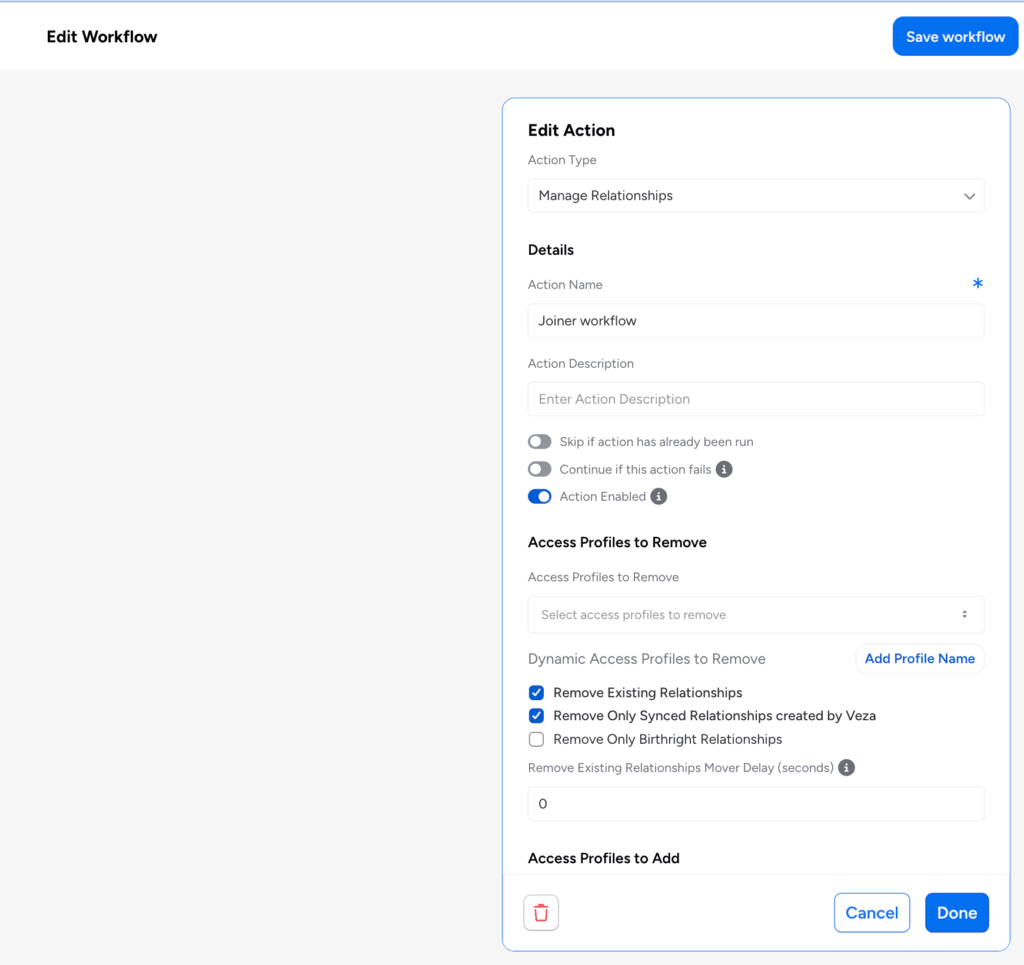
- Administrators can configure Access Profiles to Remove alongside Access Profiles to add within a single workflow action, removing specific entitlements without affecting other relationships.
- Dynamic Access Profiles to Remove: Attribute transformer expressions can resolve the profiles to remove at runtime, enabling rule-based revocation that adapts to identity attribute values.
- Remove Only Birthright Relationships: When used alongside the “Remove Existing Relationships” option, this setting restricts removal to entitlements originally granted as birthright assignments, while preserving access added through other means such as manager approvals or manual assignments.
These capabilities are particularly useful in mover workflows where an employee changing roles needs specific entitlements revoked while retaining access to shared systems.
Workflow Save Conflict Detection: Veza now detects workflow save conflicts in multi-administrator environments:
- If another administrator saves changes to a workflow while you are editing it, a dialog identifies the conflict, showing who made the change and when.
- You can then choose to force-save your version or discard your changes and reload the latest version. This prevents inadvertent overwriting of workflow configurations when multiple admins work in the same tenant simultaneously.
LDAP as LCM Source and Target: The LDAP integration now supports Lifecycle Management as both a Source of Identity and a Target System. Organizations running Red Hat Identity Manager, FreeIPA, OpenLDAP, or other LDAPv3-compliant directories can now configure LDAP as the identity source that drives LCM policy actions, and as a provisioning target for automated user and group management.
Supported operations when LDAP is configured as an LCM target include:
- Creating and deleting users
- Enabling and disabling accounts
- Updating user attributes
- Managing group memberships
Enhancements
AD User Attributes in Send REST Payload Actions: Additional Active Directory user attributes (including email, department, title, given name, display name, UPN, and street address), along with custom properties defined in the integration configuration, are now available as variable substitutions in Send REST Payload actions.
- These attributes are included in the sync_identities output entity and can be referenced in downstream workflow action payloads using the standard {{attribute_name}} substitution syntax.
- Previously, only a limited set of attributes (name, distinguished name, account name, manager, UPN, and email) were available for reference in Send REST Payload actions. Department, title, given name, display name, street address, and custom properties required additional steps or workarounds to pass to external APIs.
Accelerated Identity Table Population: The Identities table now begins populating as soon as a provisioning policy is enabled, even before any workflows are configured.
- Administrators can validate identity source connectivity and review the incoming identity population without waiting for a complete provisioning workflow (trigger and action) to be in place.
This also makes it easier to preview trigger statements using the trigger condition tester.
Password in Action Output (Early Access): Reset Password and Sync Identities actions can now include generated passwords in the action output, making them available to subsequent workflow actions via transformer expressions.
- This allows workflows to pass runtime-only credentials to downstream systems, for example, sending a newly generated password to an external provisioning API as part of a joiner workflow.
- When enabled, passwords are available in-memory during workflow execution only and are not stored in Veza.
- Because passwords are passed as plaintext values to downstream actions, use this feature only when required by the provisioning workflow, and ensure that receiving endpoints use HTTPS and handle credentials securely.
Make REST-based requests to on-prem applications: Send REST Request workflow actions can now acquire authentication tokens through an Insight Point when configured with “Login to Bearer” or “OAuth2” REST auth credentials.
- Both the token acquisition call and the subsequent REST request execute within the customer’s private network, enabling Lifecycle Management workflows to trigger actions against on-premises application APIs and token endpoints that are not publicly accessible from the Veza control plane.
In the Lifecycle Management workflow editor, the Pipeline Functions field has been renamed to “Then Apply“.
- This field, used to chain transformation functions with the pipe character, works identically to before. No existing workflow configurations are affected.
- The change appears in the transformer configuration panel, workflow detail view, and email notification settings display. A tooltip has been added explaining the syntax and providing an example.
Access Requests
Enhancements
Send REST Payload Catalog Definitions: Administrators can now create Access Request catalog definitions with the type Send REST Payload.
When a user submits a request for this catalog item, Veza triggers the configured Send REST Payload action directly, without requiring an ITSM ticket.
- Administrators configure the catalog definition by selecting an existing Send REST Payload action from the associated provisioning policy.
- This enables fully automated fulfillment of access requests for systems integrated via REST API, without requiring ServiceNow or Jira as an intermediary.
Please note that individual releases can include additional bug fixes and performance improvements not detailed in this document. For more information about any features or bug fixes, contact your Veza representative.