
Medical technology giant Stryker recently suffered a devastating cyberattack. Pro-Iranian hackers from the group Handala claimed responsibility for wiping data from over 200,000 devices, including servers, laptops, and employee mobile phones, while allegedly extracting 50 terabytes of sensitive information. This attack forced global shutdowns across Stryker’s operations in 79 countries, disrupting manufacturing, shipping, and daily workflows. Reports indicate the attackers exploited administrative access in Stryker’s Microsoft 365, Entra ID (formerly Azure AD), and Intune environment to issue remote wipe commands via Intune—a legitimate mobile device management (MDM) tool turned into a weapon. The incident highlights critical gaps in identity and access management (IAM), where overly permissive roles and weak authentication controls can lead to catastrophic outcomes.
As organizations increasingly rely on cloud-based tools like Microsoft Intune for device management, the risk of such “living-off-the-land” attacks—where adversaries use built-in features rather than malware—grows. But what if you could proactively identify and mitigate these vulnerabilities before they’re exploited? Enter Veza where we can provide deep visibility into permissions, roles, and access paths across cloud environments. By querying complex relationships in systems like Azure AD and Intune, Veza helps security teams uncover hidden risks that traditional tools might miss.
In light of the Stryker breach, we’ve developed a specialized dashboard in Veza to monitor and detect vulnerabilities related to device wipe capabilities. This dashboard draws on real-time queries to spotlight misconfigurations and excessive privileges that could enable similar attacks. Below, we break down four key queries from this dashboard, demonstrating Veza’s power in preventing unauthorized device wipes.
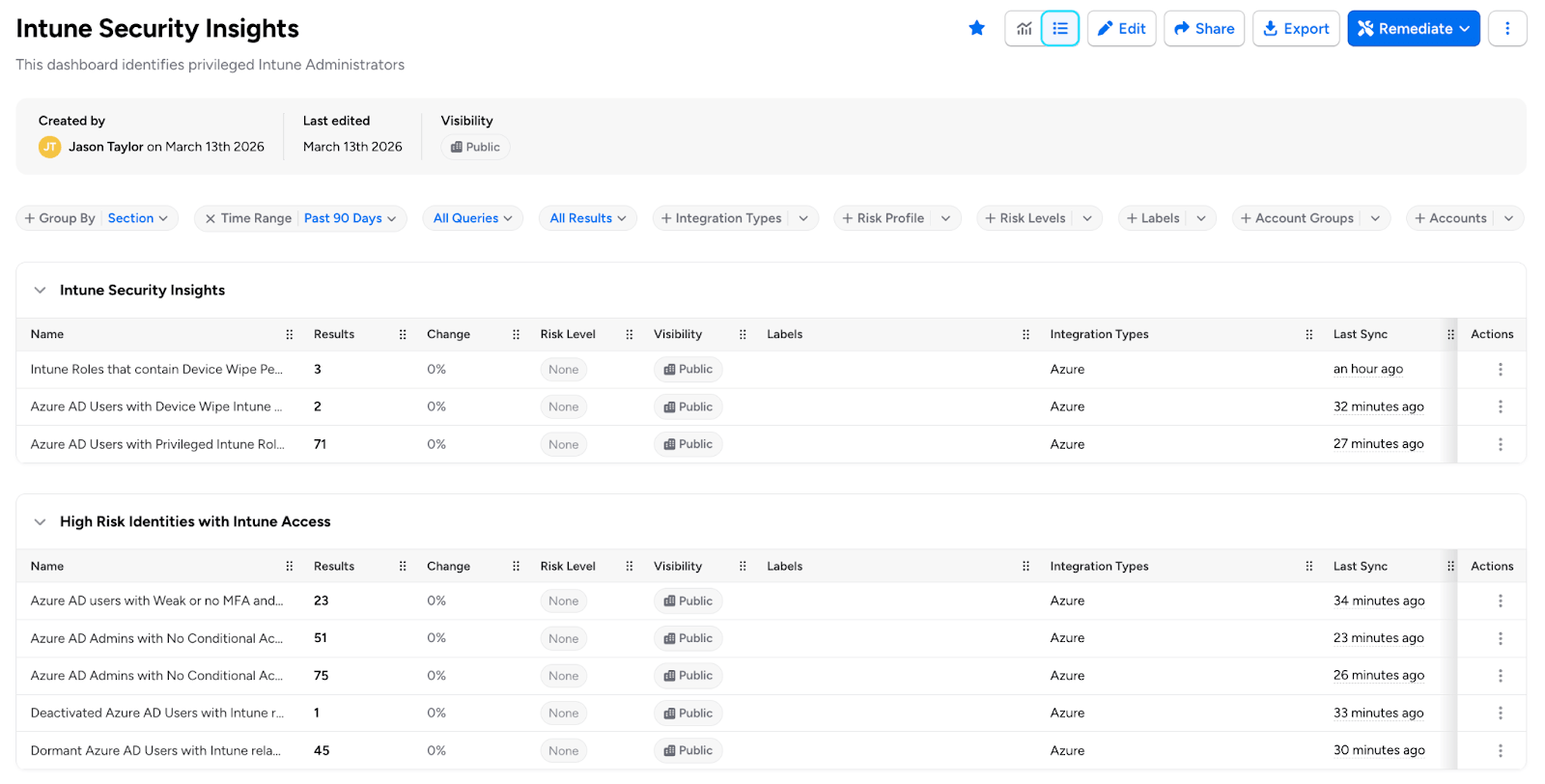
1. Azure AD Admins with No Conditional Access Policy Applied with Phishable MFA Methods (Using Phishable Methods)
One of the most common entry points for attackers is compromised admin credentials without robust multi-factor authentication (MFA). In the Stryker case, gaining admin-level access allowed hackers to weaponize Intune features. Veza’s query identifies Azure AD admins who lack enforced MFA via conditional access policies, including those using phishable MFA methods (e.g., SMS or phone calls, which are vulnerable to SIM-swapping or social engineering).
Why it matters: Without mandatory and phishing-resistant MFA (like hardware keys or authenticator apps), admins can perform highly privileged actions—such as issuing wipe commands—without additional verification. This query reveals users who could be a single phishing email away from granting attackers full control.
How Veza Helps: Running this query surfaces a list of at-risk admins, complete with their roles and access paths, enabling quick remediation like policy enforcement or role adjustments.
2. Intune Roles That Contain Device Wipe Permissions
Intune roles like Global Administrator, Intune Administrator, and Helpdesk Operator often include permissions to wipe devices—capabilities that are frequently overlooked in permission reviews. The Stryker attackers likely abused such roles to execute wipes at scale.
Why it matters: These roles are “privileged by default” in many setups, but not all users assigned to them need wipe access. Over-provisioning creates unnecessary attack surfaces, especially if roles are assigned broadly.
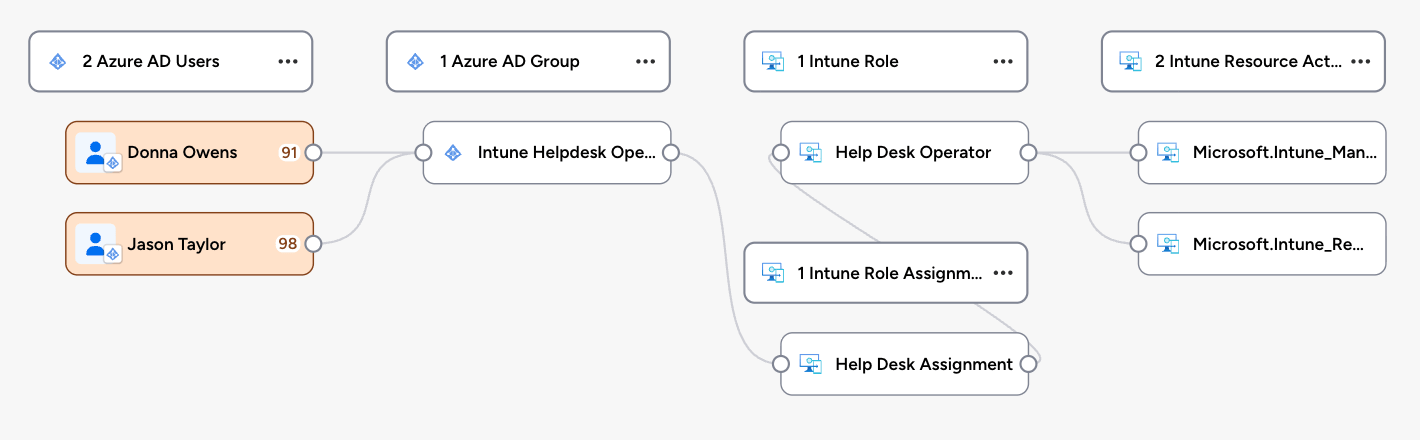
How Veza Helps: Veza maps out all Intune roles with individual permissions, highlighting often-ignored ones like Helpdesk Administrator. Security teams can then audit assignments and implement least-privilege principles, reducing the blast radius of a potential breach.
3. Azure AD Users with Device Wipe Actions for Intune Actions
Beyond roles, specific Intune actions (e.g., “Wipe Device” or “Retire Device”) can be granted directly to users, bypassing traditional role boundaries. In a breach like Stryker’s, where Intune was the kill switch, these granular permissions could be the weak link.
Why it matters: Users with these actions might not even realize their potential for abuse, but attackers certainly do. This exposes organizations to insider threats or external compromises where low-level users escalate privileges.
How Veza Helps: Veza queries drill into user-level permissions, identifying anyone with direct wipe capabilities. The dashboard visualizes these as access graphs, making it easy to spot anomalies and revoke unnecessary rights.
4. Azure AD Users with Privileged Intune Roles
Privileged roles in Intune, tied to Azure AD, often cascade permissions across ecosystems. The Stryker incident underscores how a single compromised privileged user can trigger widespread destruction.
Why it matters: These users have elevated access that extends to device management, making them prime targets. Without visibility, organizations can’t enforce segmentation or monitoring effectively.
How Veza Helps: This query lists all Azure AD users holding privileged Intune roles, cross-referencing with other entitlements. It empowers teams to implement just-in-time access or continuous monitoring, preventing persistent over-privileging.
Veza’s dashboard aggregates these queries offering real-time alerts, visualizations, and remediation recommendations. For instance, it can flag unusual access patterns or simulate attack paths, helping teams stay ahead of threats like those seen at Stryker. In a world where IAM misconfigurations are exploited in seconds, tools like Veza aren’t just helpful—they’re essential.
If your organization uses Azure AD and Intune, don’t wait for a breach to expose your vulnerabilities. Reach out to us to explore how Veza can fortify your defenses, or check out our dashboard for the Stryker-inspired security incident. Stay secure, stay proactive.