
News and Highlights from Veza Releases
As authorization entitlements proliferate across cloud, SaaS, and on-premises systems, security teams face the dual challenges of identifying which identity risks matter most, and acting on them before they escalate.
Traditional approaches ask teams to manually triage findings across tools, manage tickets in disparate systems, and coordinate remediation ad-hoc, introducing exploitable delays. Simultaneously, the expanding surface area of non-human identities (from service accounts and OAuth tokens to AI agents) creates blind spots that existing governance solutions cannot address.
Veza’s 2026.1 release introduces new capabilities to help teams manage identity risks in the modern cloud, with highlights including:
- Access Reviews with customizable Microsoft Teams notifications, bi-annual and annual scheduling for compliance alignment, and bulk operations for managing multiple reviews simultaneously.
- Risk Profiles categorize authorization risks by business impact (MFA Health, Privileged Access, Dormant Access, Blast Radius), enabling teams to prioritize remediation based on what matters to their organization.
- Dashboard Remediation Actions enable operators to initiate fixes directly via Jira, ServiceNow, or Slack, eliminating multi-day remediation cycles.
- Lifecycle Management extends identity source coverage with ServiceNow support, adds ability to update Exchange Online mailbox settings, and simplifies policy configuration with new attribute formatters.
- New integrations for DevRev and Grafana extend authorization governance to development workflows and observability platforms.
- Enterprise integration enhancements (GitLab, Snowflake, CyberArk) expand Access Graph visibility into the growing landscape of human and non-human identities that drive modern enterprises.
See below for complete details on each product area, and contact your Veza representative with questions or feedback.
Access Intelligence
Enhancements
Risk Profiles (Early Access): The Risks page now features an improved experience with Risk Profiles for categorizing authorization risks, Open/Resolved status tracking, and enhanced analytics for monitoring risk trends over time. Risk Profiles now organize queries into categories such as MFA Health, Dormant Access, and Blast Radius, helping teams prioritize remediation efforts.
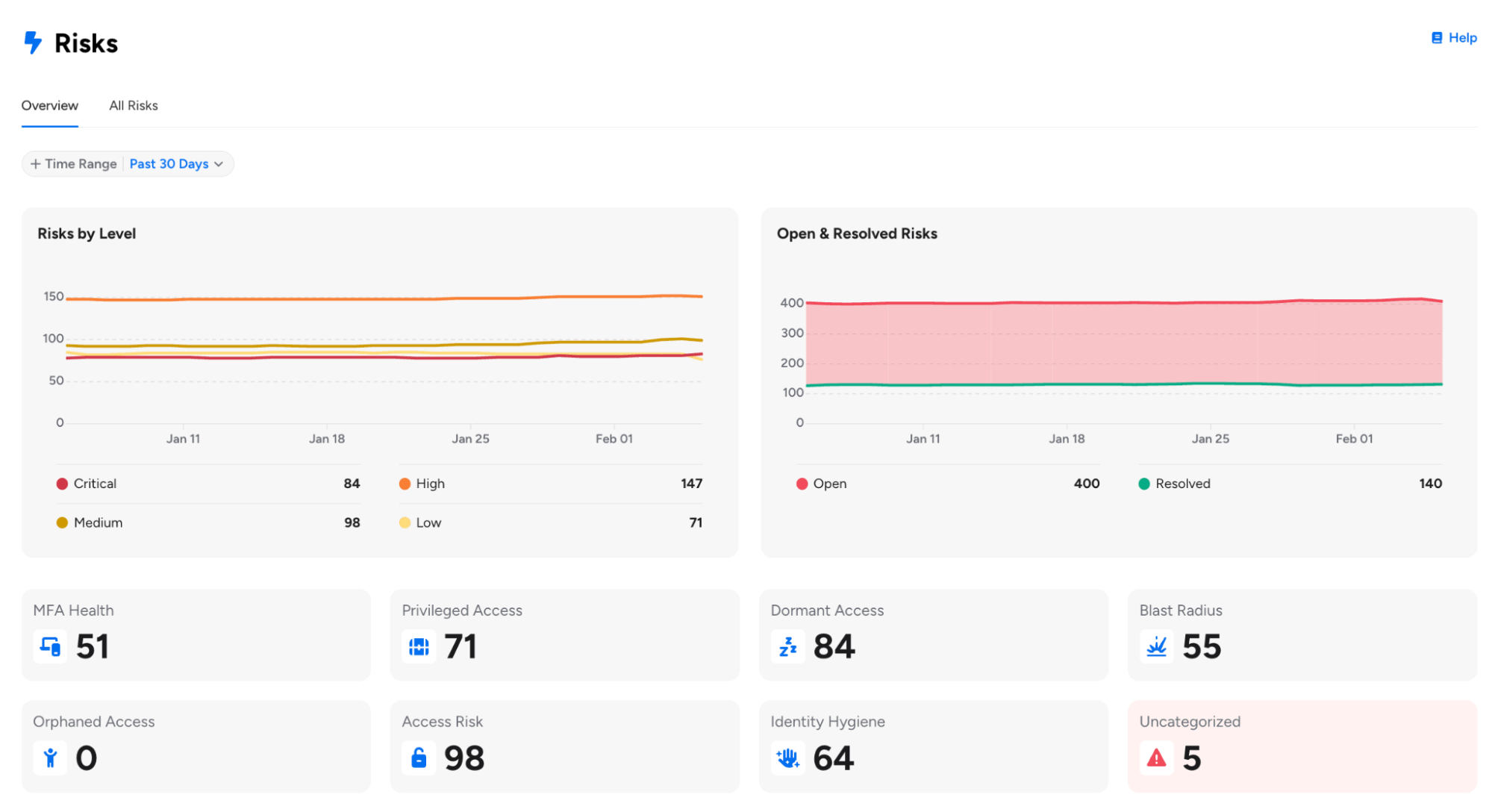
For customers already using Risk Profiles, please note the following enhancements:
- Risk Profiles can now be changed for Veza-created out-of-the-box queries, providing greater flexibility in categorizing pre-built queries according to your organization’s risk taxonomy.
- Risk Profile Bulk Update (Early Access): Users can now select multiple risks from the Risks table and assign a risk profile to all of them at once, with real-time progress tracking showing the percentage of updates completed.
- Risk Profile is now required when saving queries with a risk level, helping ensure proper categorization on the Risks page. Queries without a risk level are automatically assigned the “Informational” profile.
Available risk profiles include MFA Health, Privilege Access, Blast Radius, Dormant Access, Orphaned Access, Access Risk, Identity Hygiene, and Informational (for non-risk queries).
Dashboard Remediation Actions: You can now initiate remediation actions for individual queries or entire Dashboards directly from the Dashboard interface using the Remediate button.
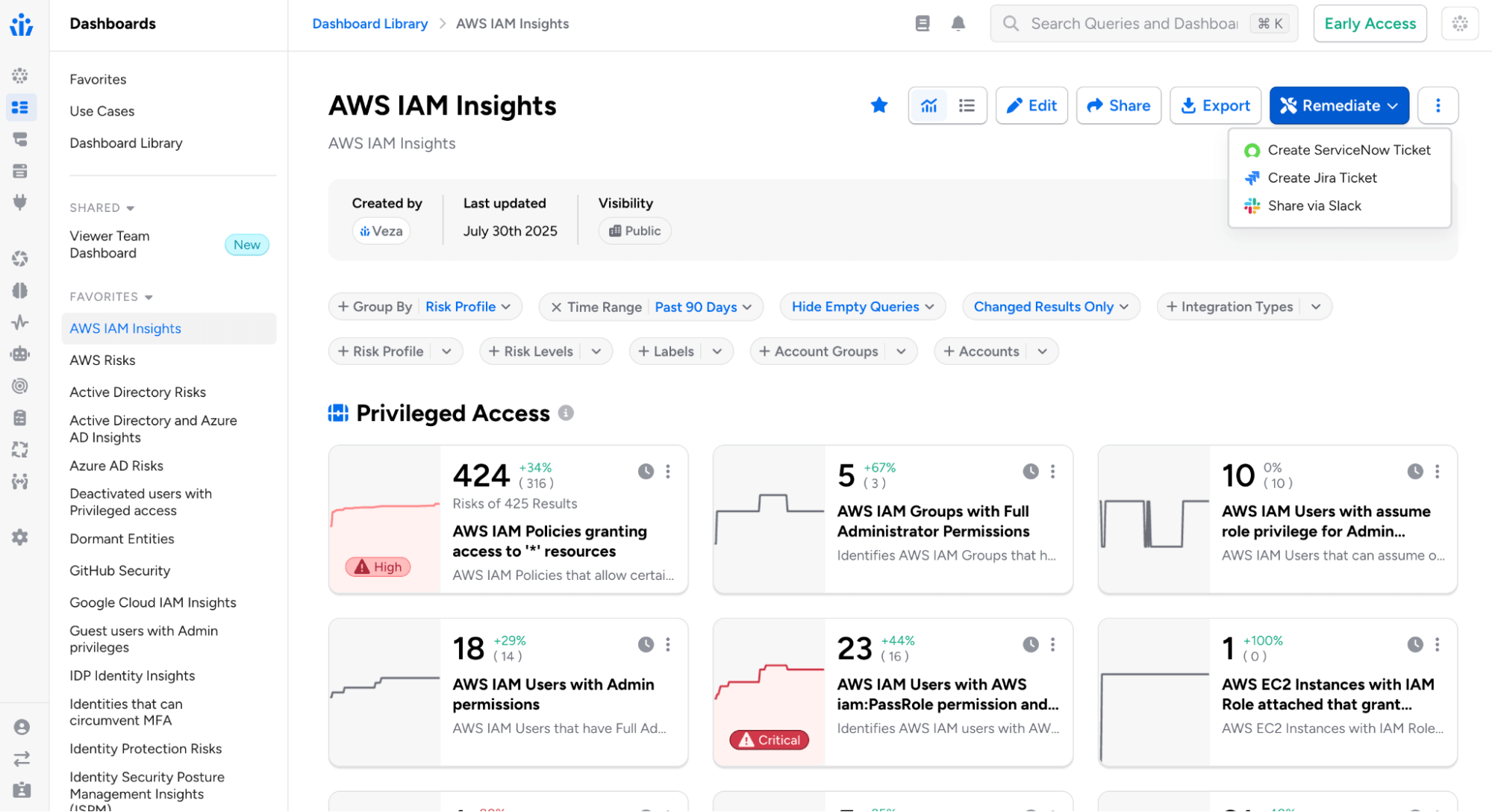
Remediation channels include:
- Email: Select recipients, customize the email subject, and add optional notes for context. Recipients receive an email that includes a direct link to the query or dashboard in Veza.
- Jira: Select one or more Jira Veza Actions, optionally assign a team member, and add contextual notes. Tickets are automatically created in Jira based on the action configurations, each including a direct link back to the corresponding query or dashboard.
- ServiceNow: Choose from configured ServiceNow Veza Actions and add optional notes. Tickets are created in ServiceNow with a direct link to the query or dashboard.
- Slack: Select one or more Slack Veza Actions and add optional notes for context. Messages are posted to configured Slack channels with links to view the findings.
Formatted Alert Email Templates:
Alert and event email notifications can now use formatted HTML templates, providing a more readable alternative to the raw JSON payload.
- The new email format includes structured presentation of alert details (severity, category, event type), timestamps, data values, and direct links to alert details and related queries.
- This option must be enabled in Veza System Settings > Use New Default Email Template.
Risk and Rules Email Templates: Administrators can now create and customize email notification templates for Risks and Alert Rules directly from the System Settings page in the “Risk Alert Email Templates” section.
- Templates support simple placeholder replacement (such as {{RULE_NAME}}, {{ALERT_NODE_COUNT}}) and Handlebars templating for conditional content.
Digest Notification Recipients: Administrators can now control which users receive assessment digest emails through a new global system setting.
- Options include All Users (default behavior) or Admin Users Only, enabling organizations to limit weekly summary digest emails to administrators. This setting is available under Administration > System Settings.
Dashboard Display Defaults in System Settings: Organizations can now set default dashboard display behavior for all users. In System Settings > Dashboards, administrators can customize the default experience for new users:
- Show All Queries by Default: Controls whether empty queries (zero results) are visible or hidden
- Show All Results by Default: Controls whether all results or only changed results appear
- These defaults apply to users who haven’t set personal preferences. Users retain the ability to customize their view using dashboard filter controls, with their preferences persisting across sessions.
Access Search
Query Builder Enhancements
Tag-Based Query Pipelines with Saved Query Filters: When using saved queries to filter other queries, you can now match entities based on tag attributes in addition to standard attributes like ID, name, or owners. Select a tag type (e.g., Veza Tag, AWS Tag, Azure Tag) and tag keys to match between the current and source queries.
Multiple Destination Types in Query Builder: Query Builder now supports selecting multiple destination entity types in a single query, returning results where source entities relate to any of the selected destinations.
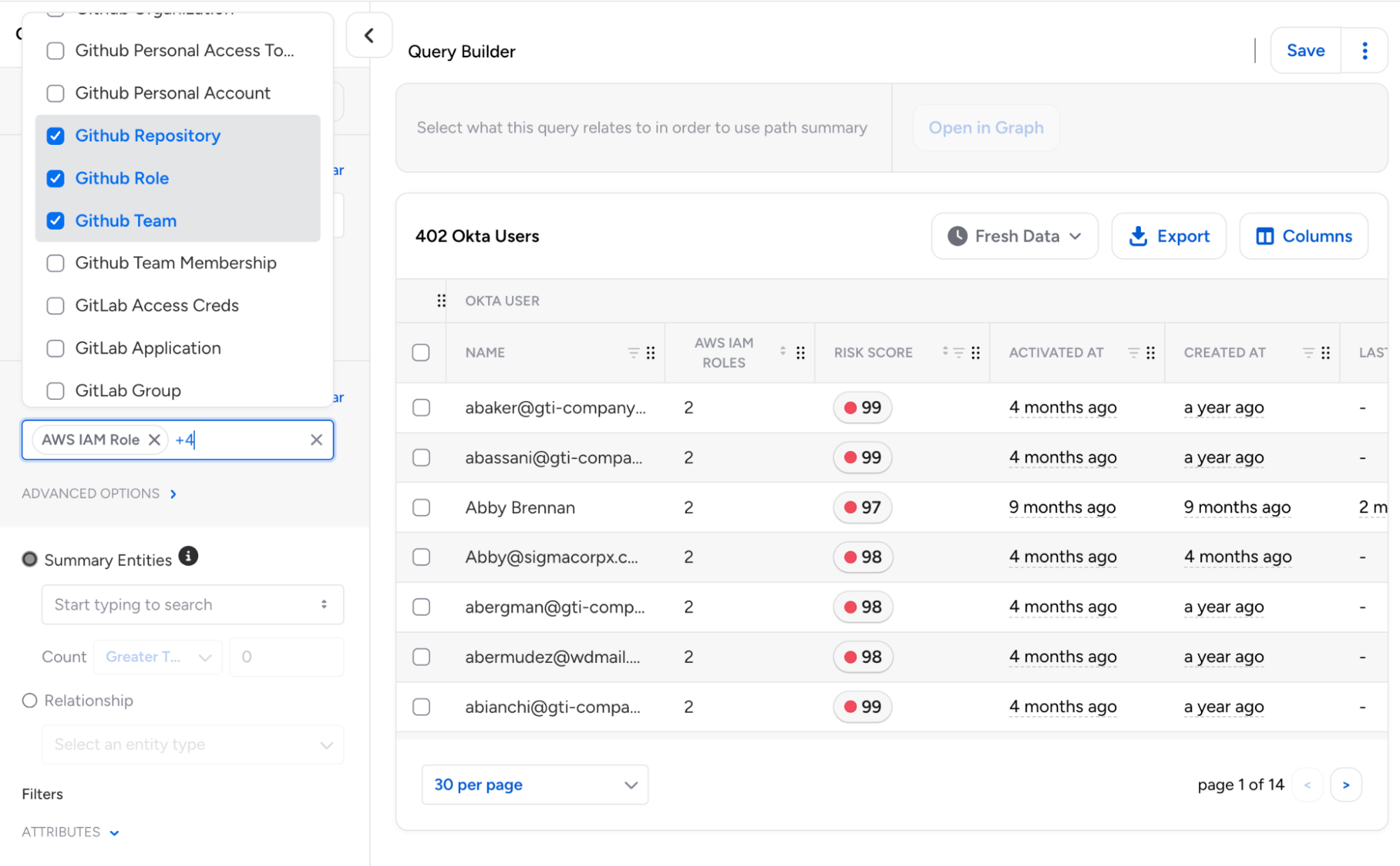
This enables unified searches across different resource types using “OR” logic, eliminating the need for separate queries for each destination type.
- Each destination can be configured independently with its own attribute filters, tags, and permission requirements.
Intermediate Entity Search: Query Builder now allows entity type groupings such as User, Group, or Role to be used directly as summary entities when displaying path information. Additionally, “Waypoint Entity” has been renamed to “Relationship” to align with Access Reviews terminology.
Custom Property Timestamp Handling: Query Builder now correctly identifies and formats timestamp properties based on their schema type definition rather than property naming patterns.
- This ensures that custom properties defined with type TIMESTAMP (including those in OAA-based integrations) display with proper date formatting and support date-relative filtering.
Time Machine UX: Query Builder now features an improved new UX for selecting Time Machine snapshots.
AI Agents and Models: Veza now supports AI Agents and AI Models as entity types in Access Graph, for queries into non-human identities that interact with AI services across your environment.
- Queries and Access Reviews using the new “AI Agent” or “AI Model” types will include standardized properties for AI Agents (publisher information and platform associations) and AI Models (publisher, model family, and model series).
Access Reviews
Microsoft Teams Integration
Microsoft Teams Notifications: Added support for Microsoft Teams as a new notification channel for reviewer reminders and alerts.
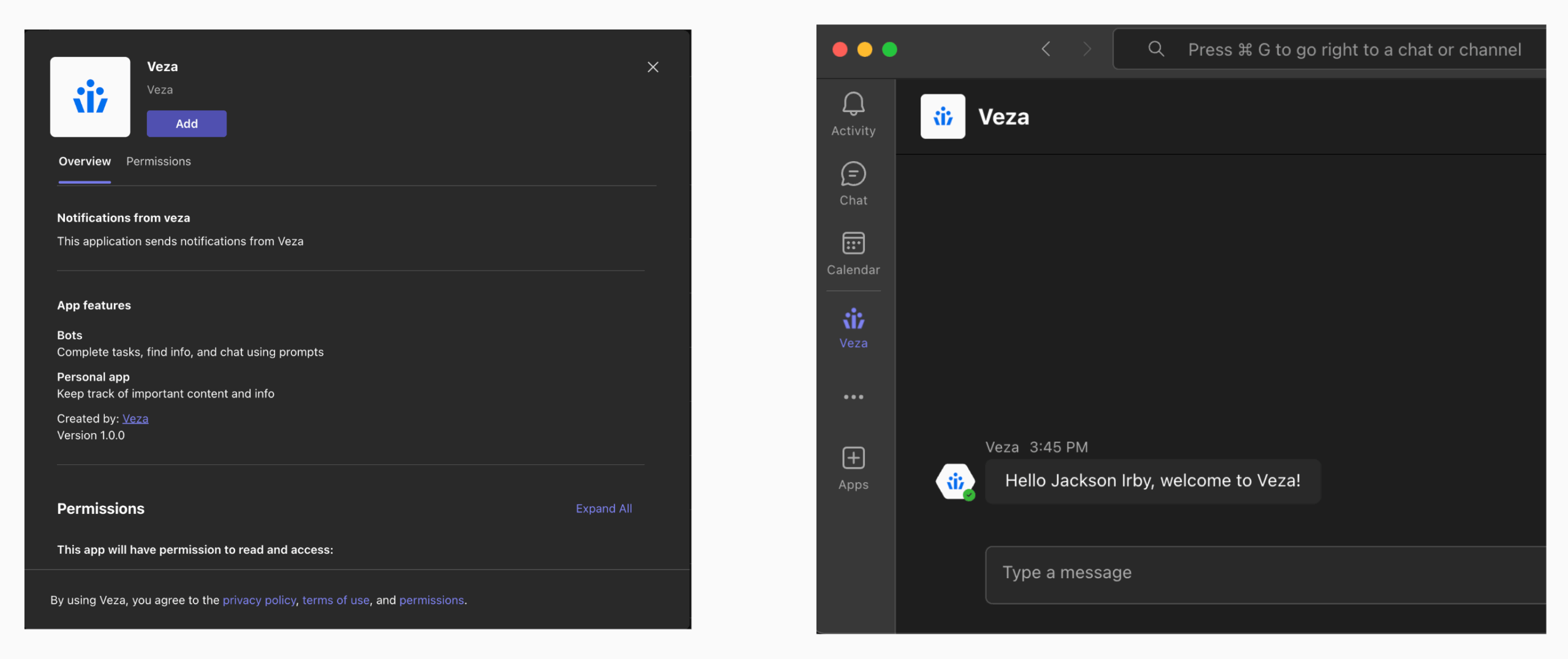
Reviewers can now receive both individual review and digest notifications in Teams via Microsoft’s cross-platform Adaptive Cards format with direct links to open reviews in Veza, and support for custom templates.
Improved Administrative Controls
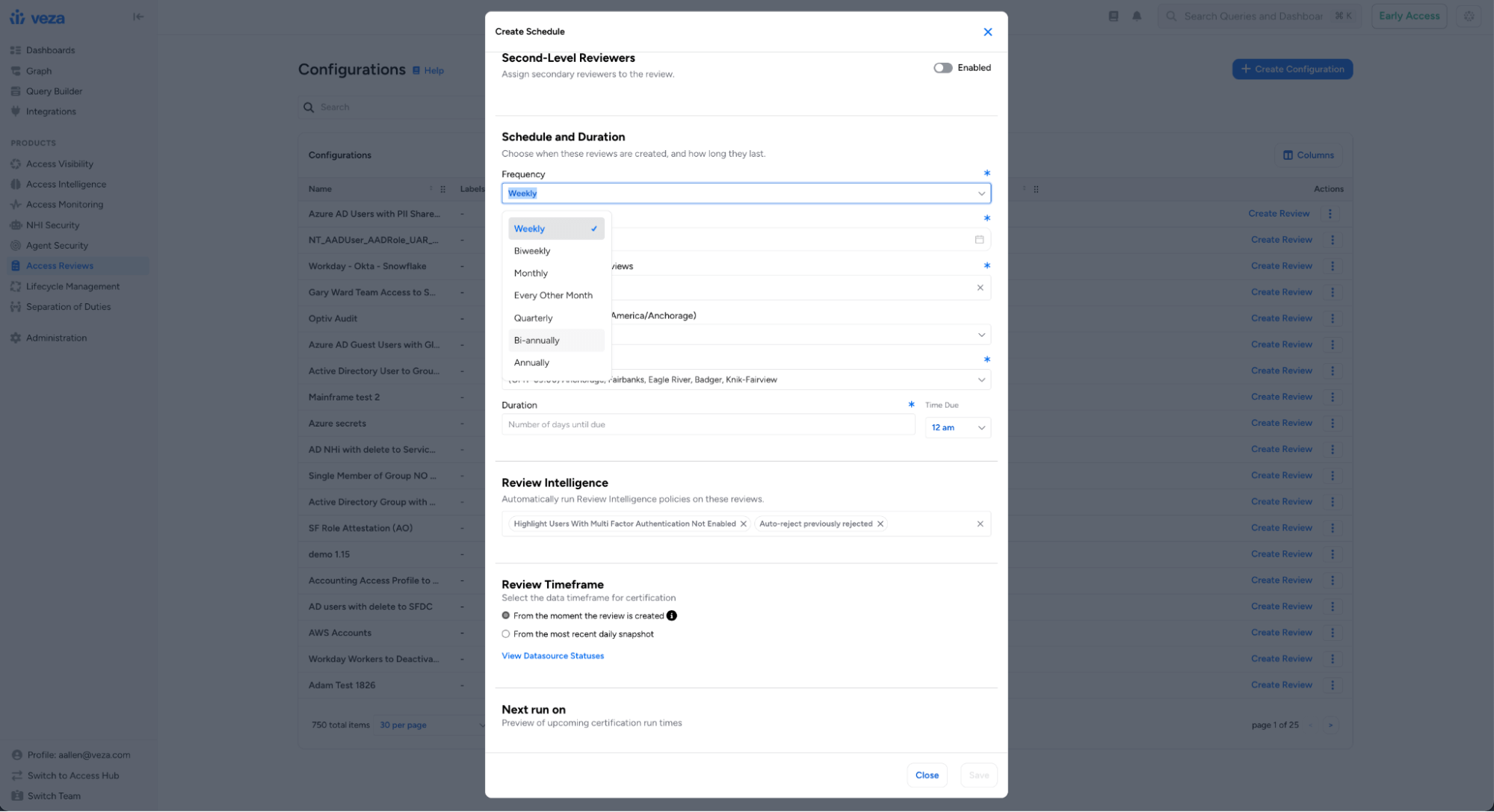
Extended Scheduling Frequencies: Review configurations now support bi-annual and annual scheduling options, in addition to existing weekly, biweekly, monthly, every-other-month, and quarterly frequencies. This makes it easier to align review cadences with annual/bi-annual compliance audits, fiscal year, or other cycles.
Bulk Actions for Reviews: Operators can now multi-select and apply operations to multiple reviews simultaneously using a new actions toolbar on the Reviews page. Bulk operations include publishing draft reviews, deleting reviews, adding/removing/replacing labels on reviews, and updating due dates.
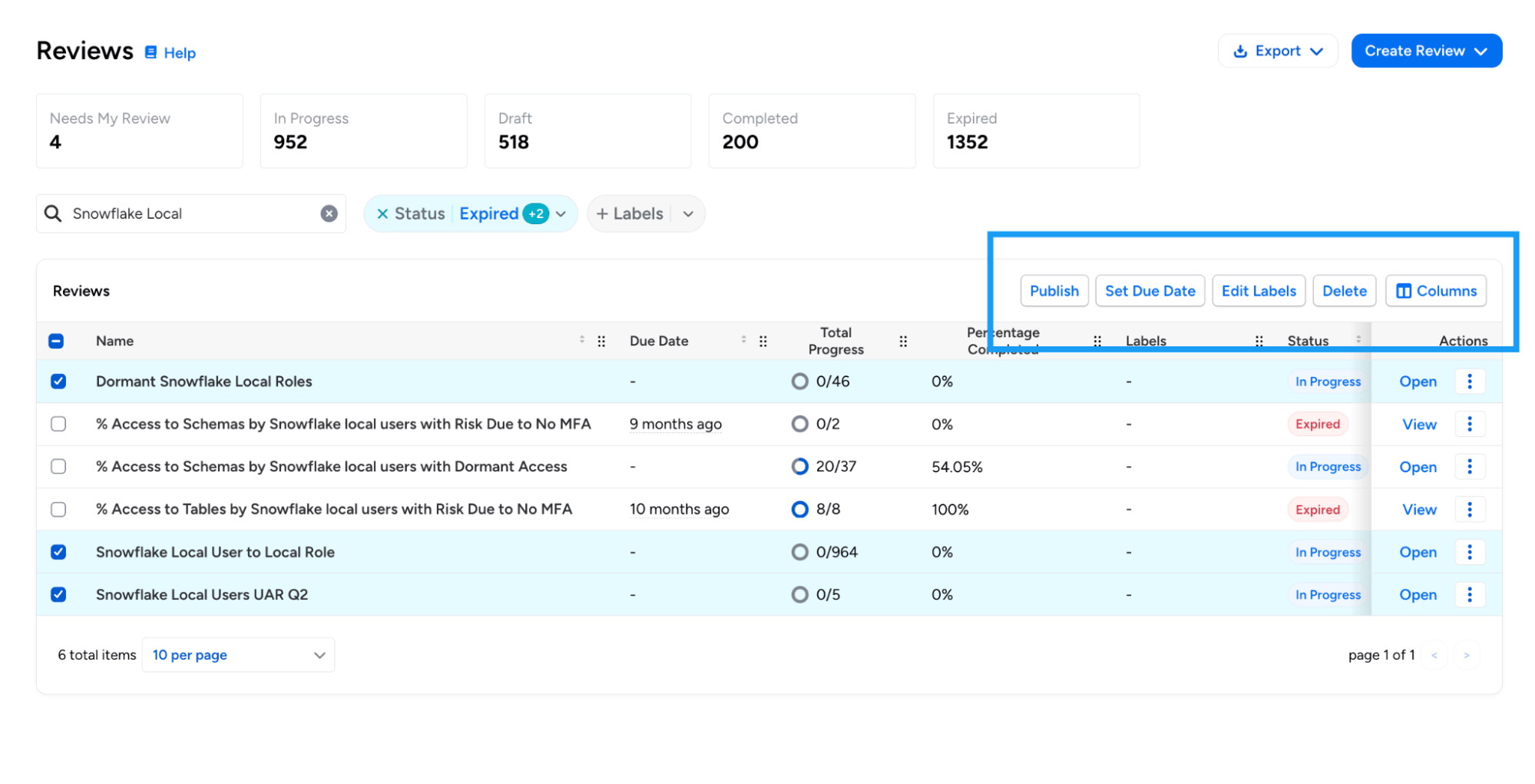
Bulk operations include publishing draft reviews, deleting reviews, adding/removing/replacing labels on reviews, and updating due dates.
Decision Clearing in Action Log: The Action Log now records when a reviewer clears a decision on an access review item, providing a complete audit trail for decision changes.
- The log entry includes the previous decision, original decider, and reason for clearing (either manual clear by the reviewer or automatic clear due to reviewer reassignment).
- This enhancement is particularly relevant in multi-level reviews, where the Level 2 reviewer needs to override the decision made by the Level 1 reviewer.
Access Reviews Events: Veza now logs an audit event when an Access Review is canceled by a user(queueing it for deletion). This event appears as `AccessReviewDeleted` in the Activity Log.
Mandatory Due Date for Access Reviews: Administrators can now require due dates when creating access reviews. When enabled, reviewers cannot create or save reviews without specifying a due date. This option is currently configurable using Global Settings APIs.
Design and Usability Enhancements
Improved Review Prioritization: Due dates on the list of all Reviews now use color coding (red for items due within a week, yellow for those within 15 days). Column ordering has been adjusted to help surface due dates and remaining work earlier in the table.
Review Column Pinning: Reviewers can now pin any column in the review table (including the “Reviewer” column) which automatically freezes the column to the left hand side. This enables reviewers and operators to customize their review list for better efficiency.
Column Order Persistence: Access Review tables now maintain customized column orders when the table schema evolves with new columns. Users can reorder and pin columns with preferences persisting across sessions and version updates.
Lifecycle Management (LCM)
New Features
ServiceNow as Source of Identity: ServiceNow is now supported as a Source of Identity (SOI) for Lifecycle Management (LCM) policies.
This enables identity synchronization and workflow automation based on ServiceNow user data from the sys_user table, including user identity extraction with attributes, group and role memberships, and relationship processing for group memberships and role assignments.
Enhancements
LCM Policies with Alias Definitions (Early Access): LCM Policies now support Alias Definitions as shorthand references for specific integrations and entity types.
Aliases can make attribute formatters and condition strings more readable, and enable greater control when policies use multiple sources of identity with the same integration type, or use the same entity type to both source and synchronize identities.
Azure AD Sync with Exchange Online Mailbox Settings: The Azure AD Sync Identities action now supports updating Exchange Online mailbox settings.
Administrators can now select a mailbox identity to sync both standard mailbox settings (such as AuditEnabled, AuditLogAgeLimit, RecipientLimits, and MaxSendSize) and CAS mailbox settings (such as OWAEnabled, ActiveSyncEnabled, EwsEnabled, MAPIEnabled, PopEnabled, and ImapEnabled).
Custom REST Actions Authentication Options: Administrators can now configure Custom REST Actions to use no authentication when connecting to endpoints that do not require credentials, such as internal services or pre-authenticated URLs.
New Attribute Formatters: Added two new formatters for attribute transformation in LCM policies:
- TITLE_CASE: Capitalizes the first letter of each word, lowercases the rest (e.g., “john doe” becomes “John Doe”). Handles dot-separated values specially (e.g., “john.doe” becomes “John.Doe”).
- SENTENCE_CASE: Capitalizes only the first non-whitespace character and lowercases the rest. Preserves any leading whitespace.
Access Reviews through Workflow Actions: When creating access reviews through the Create Access Review action, administrators can now configure a custom review name using attribute formatters. This is particularly useful for selecting unique, meaningful names for reviews in scenarios where multiple reviews can be created.
Dry Run History Improvements: The Dry Run History table now shows in-progress dry runs, with the option to cancel the run if needed.
Active Directory Account Control Flags: When provisioning Active Directory users, administrators can now specify the full range of userAccountControl flags (such as NORMAL_ACCOUNT, DONT_EXPIRE_PASSWORD, or SMARTCARD_REQUIRED) to configure account security settings during user creation.
Access Profile API Default Version: When retrieving Access Profiles via the API without specifying a version, Veza now returns the published version by default rather than requiring an explicit version number.
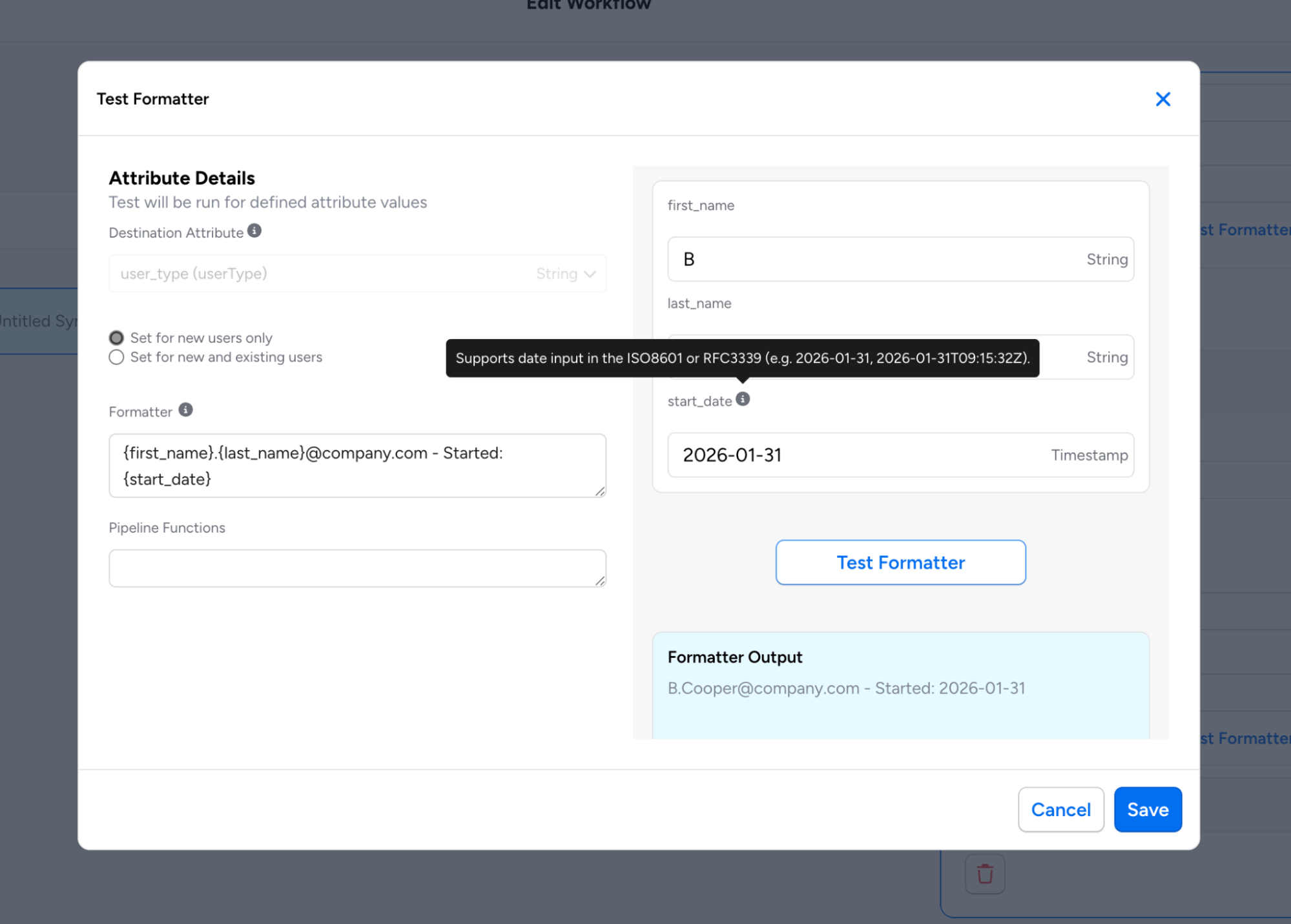
Enhanced Formatter Testing Modal: To help users understand the expected data format for each attribute, the inline preview now shows attribute types alongside each input field. Timestamp fields include a tooltip with format examples (ISO8601 or RFC3339), with support for both regular source attributes and alias definitions.
Veza Integrations
New Integrations
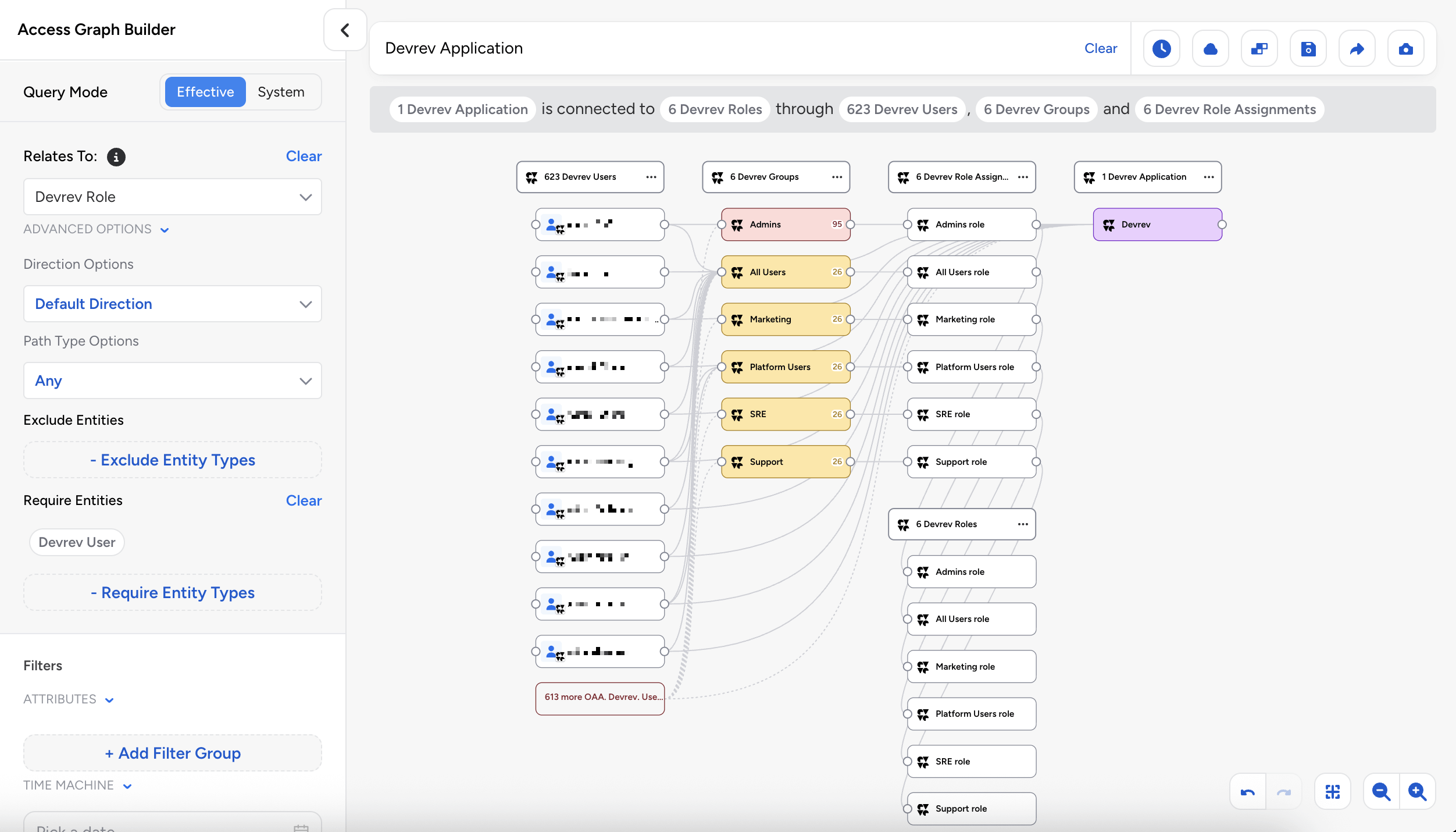
DevRev: Veza now supports discovery of DevRev authorization metadata, including users with profile information and SAML identities, groups/teams with membership associations, roles with permission assignments and conditional access (caveats), and field-level permissions.
Grafana: Veza now provides visibility into Grafana platform authorization. The new integration discovers:
- Users including login credentials, authentication methods, and provisioning status
- Teams and membership associations and external sync status
- Service Accounts (Non-human identities with associated token counts)
- RBAC Roles with permission associations (when Grafana RBAC is enabled)
- Permissions (Action-based and scoped)
Enterprise Integration Enhancements
Okta Cross-Application Service Account Discovery: Enhanced Okta integration to support cross-application service account discovery, creating direct App-to-App relationships between entities with the “Can Assume” relationship type. This provides improved visibility into non-human identities that access multiple Okta applications.
AWS Bedrock Guardrail Policies: Added support for AWS Bedrock Guardrail Policies, enabling visibility into AI safety controls and their associated permissions. The AWS integration now discovers content filter configurations (input/output) by severity level, blocked word policies with word counts, and guardrail-to-agent version relationships.
GitLab: The GitLab integration has been enhanced to support service accounts, access tokens, hierarchical resources, and SAML SSO visibility. Administrators can optionally skip user details collection for faster extractions (this will omit Email, IsAdmin, LastLoginAt, and Identity Type attributes).
Workday: When configuring a Workday integration, you can now choose which data sources to discover and extract: Worker data, IAM data, or both. This provides improved flexibility for organizations that only need specific Workday data, and want to omit unneeded metadata collection.
OracleDB: Added support for tracking password and login activity for OracleDB Local Users and Common Users, with support for new attributes including “Password Change Date”, “Password Expiration Date”, and “Last Login Date”.
AWS ECR: Added ecr:PutAccountSetting permission to the supported ECR permission set, enabling visibility into IAM principals that can modify ECR account settings.
Kubernetes: Added support for AWS China and GovCloud EKS cluster ARNs.
UKG Pro: Added optional time zone configuration for employee date fields using IANA format (e.g., America/Los_Angeles) for precise handling of termination dates and hire dates across different time zones.
GitHub Enterprise: Added support for extracting GitHub Enterprise Roles and Role Assignments.
CSV Upload: CSV integrations now feature an “Upload CSV” button directly on the Integration page for faster data uploads.
CyberArk: The CyberArk Identity integration now discovers and analyzes group entities, providing visibility into group-based access control within the CyberArk Security Platform. Groups are automatically discovered from role membership data. When CyberArk Identity uses Azure AD or Active Directory as a directory service, groups are automatically linked to their external IdP counterparts via Object ID (Azure AD) or Distinguished Name (Active Directory) matching.
Appian Role and Group Descriptions: The Appian integration now extracts and displays the description field for both Groups and Roles. These descriptions provide important context about each group’s or role’s purpose and scope, enhancing visibility during access reviews and security investigations.
Snowflake MFA Discovery: Improved coverage of MFA methods for Snowflake, expanding support beyond Duo Security to include all Snowflake-supported MFA providers, with the following attribute changes:
- Duo Security Enabled (duo_security_enabled): New attribute indicating if Duo Security specifically is enabled for a user
- MFA Enabled (mfa_enabled): Now uses Snowflake’s HAS_MFA flag to detect any MFA provider, including Duo Security, Azure, and other methods
Veza Platform
Enhancements
Sign-On Audit Events: Veza now generates audit events when administrators modify sign-on settings. New event types include changes to SSO redirect, SCIM provisioning, SAML enable/disable, MFA requirements, IdP-managed roles, and OIDC configuration.
OIDC Claims from Access Tokens (GA): Reading OIDC claims from JWT access tokens is now generally available. This enables Veza to extract identity information from access tokens issued by OIDC providers for single sign-on (SSO). Administrators can configure custom access token issuer validation, custom audience validation, and attribute extraction from access tokens.
Note: Individual releases can include additional bug fixes and performance improvements that are not detailed in these notes. For more information about any features or bug fixes, contact your Veza representative.