
Veza has always excelled at helping teams see identity risk clearly – surfacing dormant accounts, orphaned identities, toxic access combinations, and privilege anomalies across your entire environment. But seeing the risk and fixing the risk have always been two separate steps, in two separate places: create tickets, send notifications, or launch access reviews.
Until now.
We’re bringing remediation directly into the query experience. You can now disable risky accounts right from your Veza query results – with safety guardrails, a granular preview, and a full audit trail baked in.
Veza already supports account disabling through Access Reviews or Lifecycle Management. What’s new is where that action lives: directly inside the risk visibility workflow in our Access Intelligence solution, surfaced the moment you find the problem. No pivot to another module. No workflow handoff. You see the risk in a query – you act on it right there.
Your Remediation, Your Way
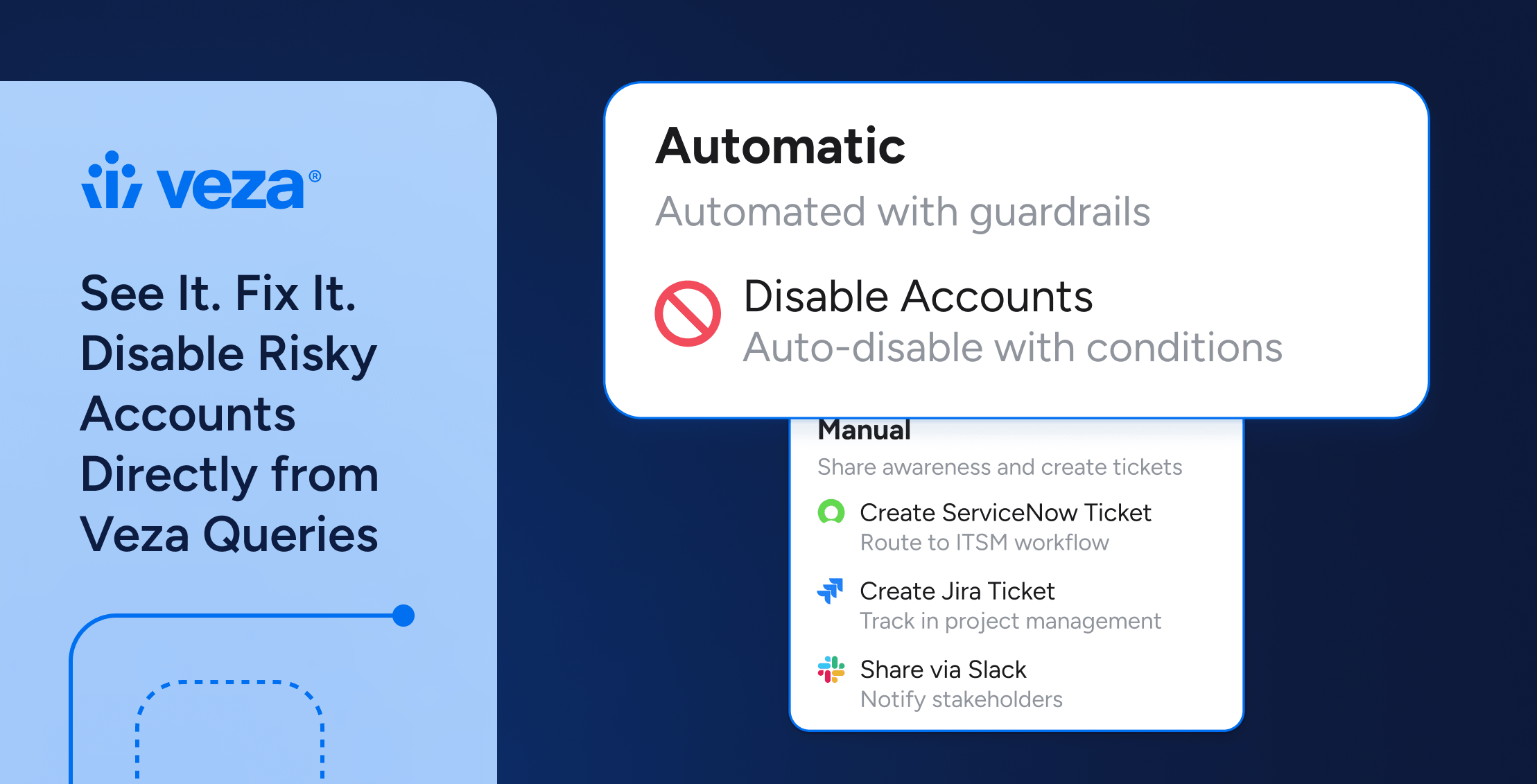
Every organization is different and every risk deserves the right response. Veza gives you the flexibility to choose how you remediate:
- Launch access reviews for multiple layers of approvals
- Trigger workflows through ServiceNow/Jira tickets or notification emails
- Take direct action when the risk is clear and immediateThis is the flexibility that identity security at enterprise scale demands.
The Gap We’re Closing: Risk Visibility and Remediation, Finally Unified
Veza’s Access Graph gives teams unmatched visibility into identity risk. You can query across Okta, Active Directory, Entra ID (formerly Azure AD), surfacing dormant users, orphaned service accounts, and privilege anomalies with precision. But until now, acting on those query findings required a separate journey.
This creates real costs:
- Remediation lag: the time between identifying a risk and closing it
- Audit gaps: manual steps that aren’t tracked or timestamped in a central log along with query
- Human error: copy-paste mistakes when moving account lists between tools
- Operational burden: context-switching overhead multiplied across thousands of findings
The most common example? Dormant accounts. A user inactive for 180+ days in Okta. A service account that hasn’t been authenticated in a year but still holds live permissions in Azure AD. An ex-employee whose Workday record is closed but whose AD account is still active. These are known risks and the fix is straightforward. The friction is in the execution.
What’s New: Remediation Surfaced at the Point of Risk
Disable Accounts is now accessible directly from within Veza’s query results – no pivot required. Starting from any query that surfaces risky accounts – dormant users, orphaned identities, inactive service accounts, you can take action right where you found the risk:
- Identify the accounts using Veza’s Access Graph queries
- Confirm safety guardrails before any action is taken
- Preview exactly which accounts will be affected and be able to choose
- Execute the disable action with a mandatory audit note
- Track every action in the Remediation Log – timestamped, attributed, with completion status.
Supported today across Okta, Microsoft Entra ID (formerly Azure Active Directory), and Microsoft Active Directory – the three identity systems where dormant and orphaned account cleanup is most critical at enterprise scale.
The Veza Platform: From Insight to Action
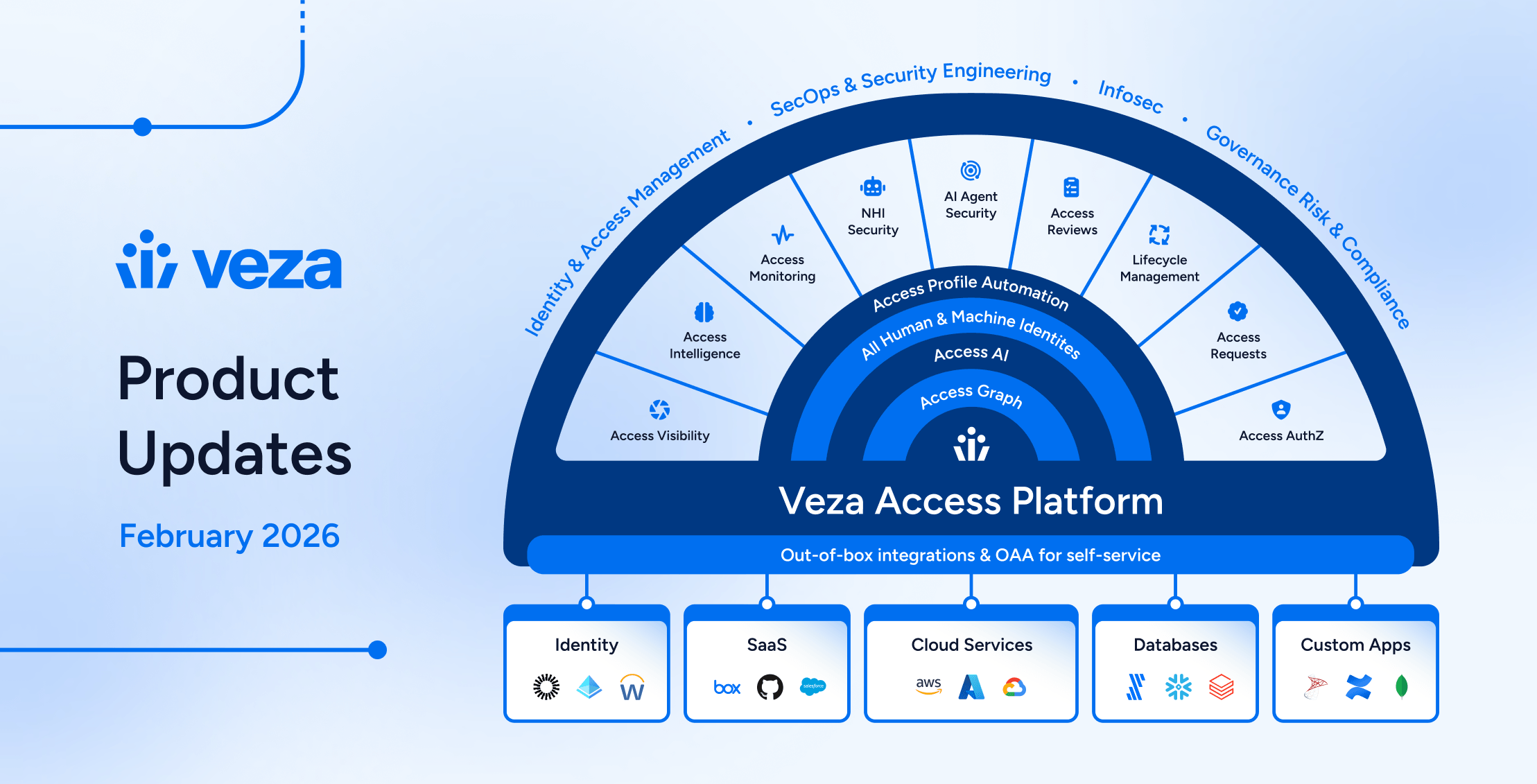
Disable Accounts sits at the end of a continuous workflow – connecting integrations, contextual risk surfacing, and now, direct remediation.
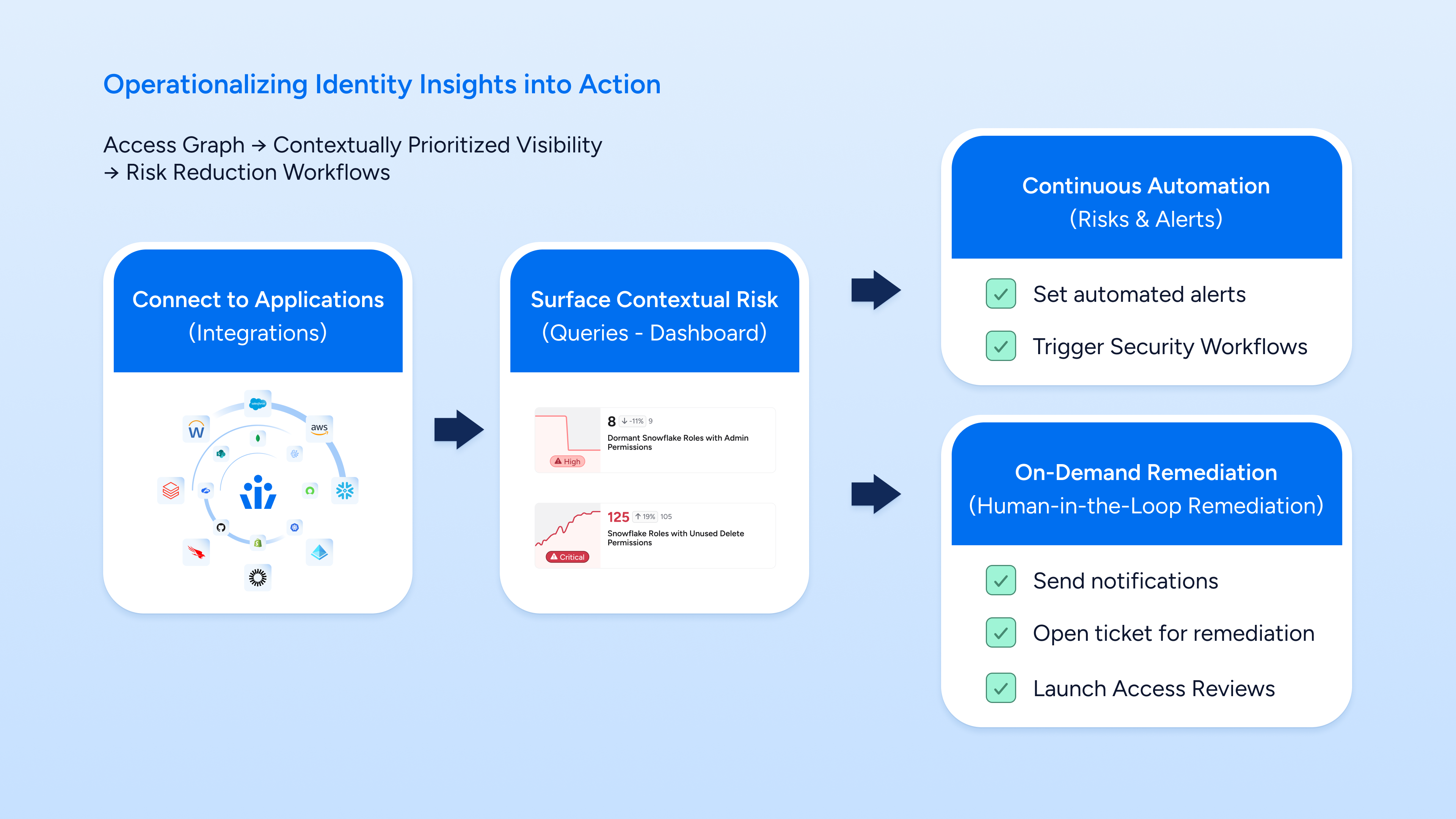
Figure 1: From Access Graph integrations → contextual risk queries → continuous automation and on-demand remediation
How It Works: Four Steps from Detection to Audited Action
Disable Accounts is designed to be both powerful and safe. Every step is intentional to ensure remediation is accurate, reversible where possible, and fully auditable.
① Find the Risk with a Query
Write or select a query in Veza. For example: “Okta Users that are Inactive or Dormant but still have access to Resources.” The Access Graph returns a precise list of matching identities across your environment, with risk scores, last activity dates, and resource relationships.
② Confirm Safety Conditions
Before any action is available, Veza checks that pre-defined safety conditions are met. These guardrails, fully customizable by your team in the query – verify that the query’s conditions are still valid and that the action is appropriate to proceed.
③ Preview and Select Target Accounts
A granular preview shows you exactly which accounts will be affected, their current status, and last activity. You choose which accounts to process, giving human reviewers full control before committing to action.
④ Execute with a Mandatory Audit Note
Add a note describing the reason for the action. This note is captured in the Remediation Log and becomes part of the permanent audit record. Hit Execute, and Veza immediately begins disabling the selected accounts across the connected identity system.
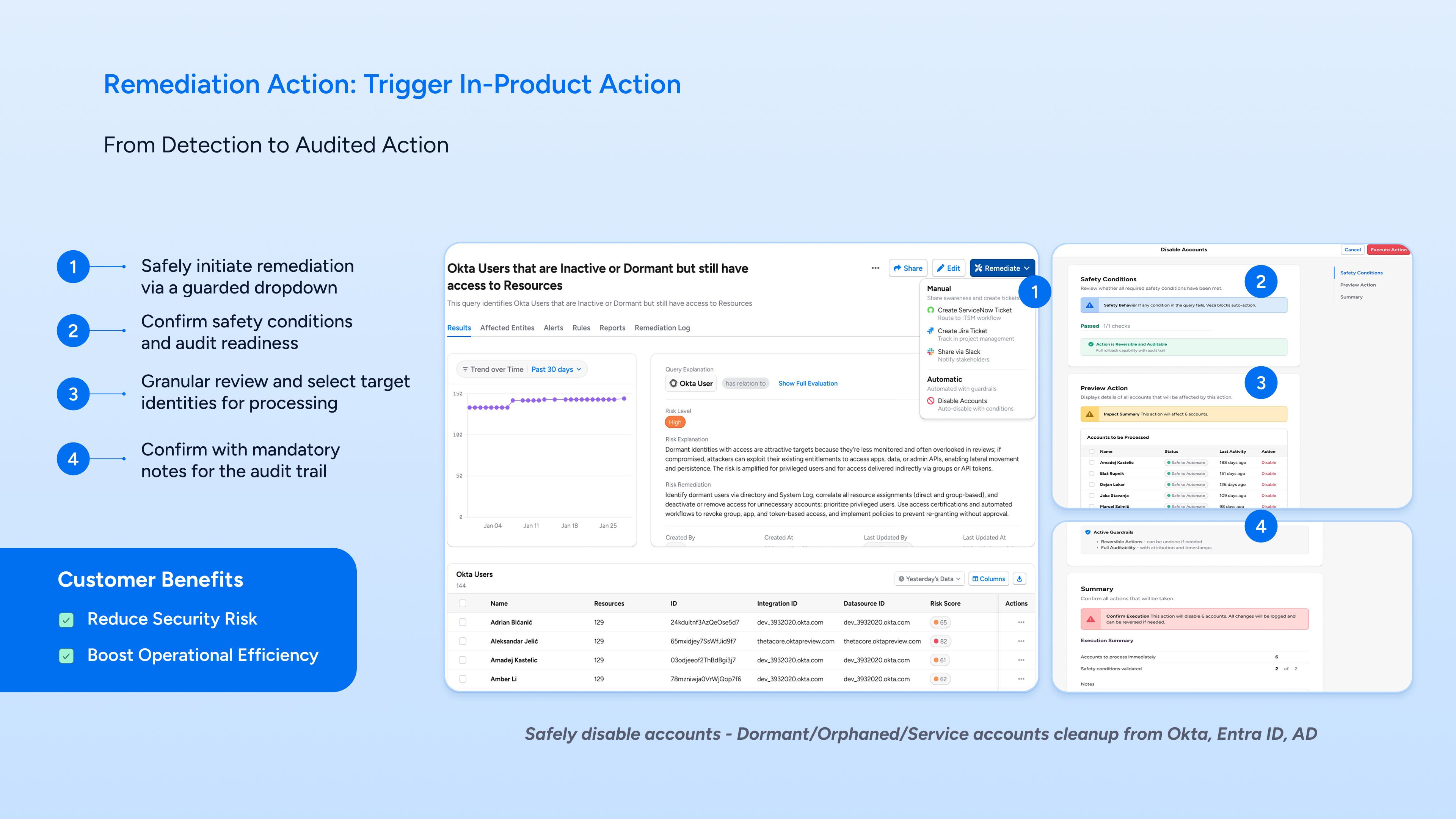
Figure 2: The in-product Disable Accounts workflow — guarded dropdown, safety conditions, account preview, and execution with audit notes
Safety by design: Actions in Veza are reversible where applicable, fully logged, and require mandatory notes before execution. You get automation speed with human-grade accountability.
What You Can Remediate Today
Disable Accounts unlocks immediate remediation for the most common identity hygiene tasks:
Dormant User Accounts
Find users inactive for 90, 180, or 365+ days in Okta, Azure AD, or Active Directory who still hold active entitlements. Disable them directly – no export, no context switch.
Orphaned Accounts
Identify users whose records are deactivated or absent in Workday (or another HRIS) but who remain active in Okta, Entra ID (formerly Azure AD), or AD. These ghost identities are a persistent risk – now you can close them in one workflow.
Inactive Service Accounts
Surface service accounts or API tokens that haven’t authenticated in a defined period but still carry production-level permissions. Disable them before they become an attack vector.
The Remediation Log: Every Action, Fully Auditable
Every Disable Accounts execution is automatically captured in Veza’s Remediation Log. This isn’t just a history, it’s a compliance-grade audit trail that answers the questions regulators and auditors always ask:
- Who executed the action?
- Which accounts were affected?
- When did it happen?
- What was the stated reason (from the mandatory note)?
- What is the current status of each entity processed?
The log is searchable, and persistent – giving compliance teams the evidence they need without any additional instrumentation.
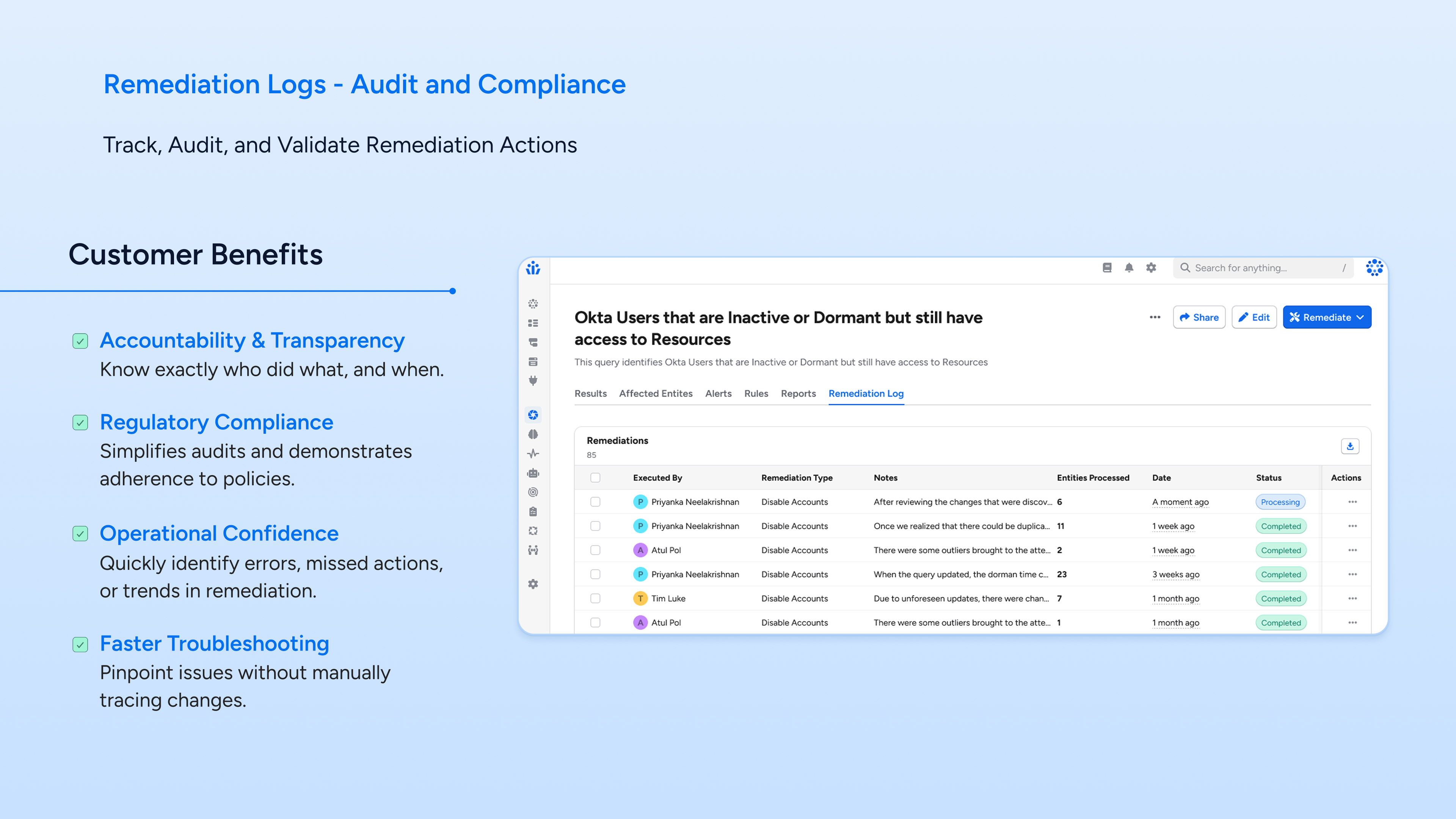
Figure 3: The Remediation Log — tracking who disabled what accounts, when, with notes and per-entity status
Why This Matters: Risk Visibility and Remediation, in One Motion
This isn’t a new capability in isolation – Veza has supported account disabling through LCM for some time. What’s new is the integration with risk visibility. By surfacing the Disable Accounts action directly from query results, we’ve collapsed what used to be a multi-step, multi-module workflow into a single, continuous motion: find the risk, confirm it’s safe to act, preview the impact, execute, and log it – all without breaking context.
This is the first action to be surfaced this way in Veza, and the pattern for how we’ll bring more remediation capabilities closer to the risk signals that trigger them. The goal is a platform where every risk you surface comes with a clear, safe, auditable path to resolution.
Risk visibility and remediation belong together.See it in a query. Fix it in the same workflow. That’s the new standard.
Try It Today
If you’re a Veza customer, this is available now. Run your dormant or orphaned account queries and take action directly from the results.
- Explore Veza: veza.com/product
- Schedule a demo to see it live
See it. Fix it. No detours.