
The Challenge of Prioritizing Identity Sprawl.
In identity security, the challenge is not collecting more data. It is using that data to answer one question reliably: who has access to what, through which path, and what could they do with it? As organizations scale, the work shifts from visibility to prioritization, and IAM teams must remediate high-priority risks.
Security teams are being asked to manage identity risk across cloud, SaaS, and non-human identities at a scale that breaks traditional “lists of findings.” As environments grow into billions of permissions and relationships, tools have to do more than enumerate access. They need to prioritize it, add context, and support repeatable remediation workflows, or the team drowns in noise while the real exposure stays open. Just as important, teams need a clear way to track risk posture over time so they can demonstrate burn-down and remediation impact.
Customers have been clear: visibility is valuable, and Veza has helped surface risks they did not previously see. The next step is making that visibility operational, so teams can prioritize remediation and track how risk posture trends over time.
Teams need help making specific decisions quickly: what to tackle first, who should own remediation, whether the right next step is to remove access, run an access review, set an alert, or document an exception. Risk 2.0 has two goals: first, to help teams visualize risk posture more clearly through trendlines, better insights, and classification into Risk Profiles; second, to turn risk signals into prioritized, explainable work that an operator can act on without guesswork.
We are introducing Veza Risk 2.0, an evolution of how we organize, score, and operationalize identity risk. It includes an updated risk scoring approach that is already available, plus two enhancements rolling out in phases: the Veza Risk Framework and the New Risks Page.
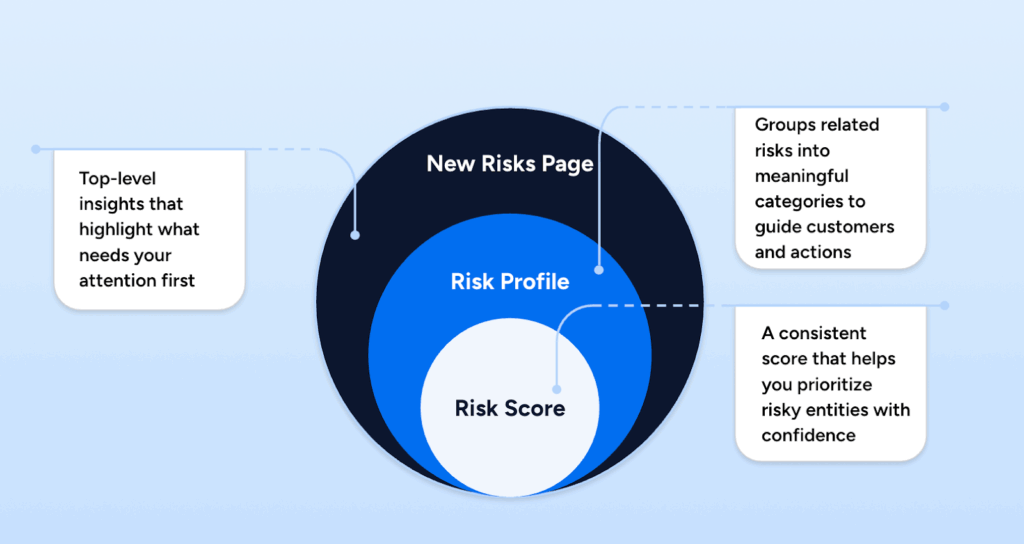
In the next sections, we break down the Veza Risk Framework, the New Risks Page, and the updated risk scoring approach.
What’s new in Risk 2.0: scoring, categorization, and visualization
1. The New Risks Page: Your Unified Risk Dashboard
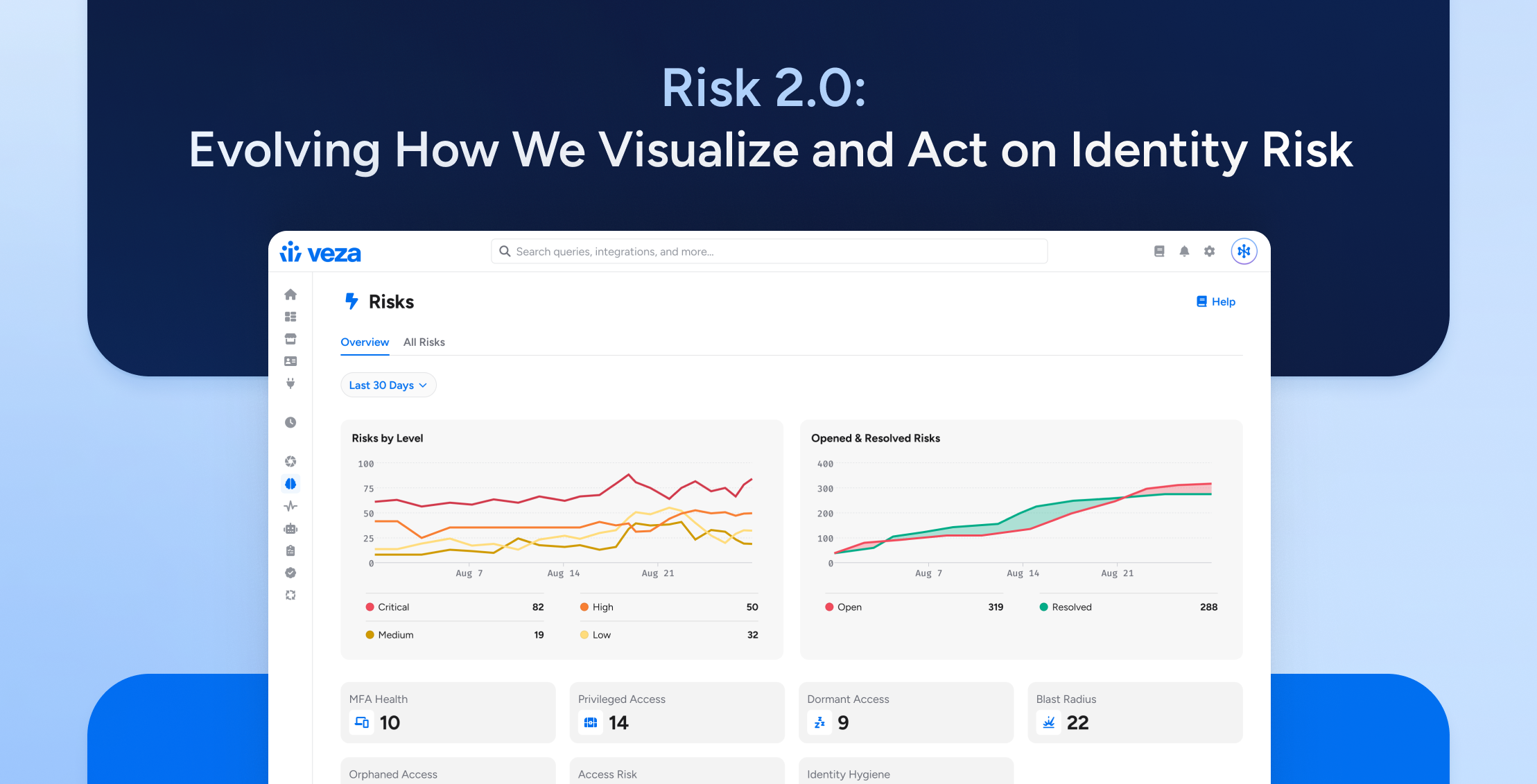
We are bringing risk visibility, prioritization, and action into a unified view. The new Risks page is designed to be your “Single Pane of Glass” for Identity Security Posture Management (ISPM), with two core tabs: Overview and All Risks.
This experience consolidates top risks across your integrations, for example, AWS, Snowflake, Okta, Microsoft Entra ID (formerly Azure AD), Google Cloud Platform (GCP), etc., so teams can prioritize what matters without jumping between consoles.
Key Features:
- The Executive Overview: In the Overview tab, the Open & Resolved Risks chart tracks risk posture over time, showing “Risks Opened” vs. “Risks Resolved” to provide auditable evidence of risk reduction that supports remediation ROI conversations.
- Unified Risk Dashboard: In the All Risks tab, you get a single table that lets you slice and dice by Status (Open or Resolved), Risk Level, Risk Profile, and integration, so you can narrow scope and remediate risks faster.
- Direct Actions: From the All Risks table, use the Actions menu (⋮) to take next steps such as launching an access review, creating an alert or rule, or managing exceptions.
From Insight to Action in Three Clicks
Moving from identifying a critical risk to taking the first step in remediation is now simplified with a clear, three-step workflow on the new Risks Page.
- Start with the Overview to spot posture and trends.

2. Click a Risk Profile (for example, “Blast Radius”) to jump into All Risks with the right scope applied.
3. Use the Actions menu (⋮) to take the next step, such as launching an access review, creating an alert or rule, or managing exceptions.
If you need deeper context before you act, open the risk query to see the Risk Explanation, Trend over Time, and Affected Entities, then drill into entities as needed to review risk context and supporting details.
Finally, “Resolved” is explicit and auditable. A risk moves from Open to Resolved either because the underlying issue was remediated and entities no longer appear, or because specific results were reviewed and marked as exceptions. That distinction matters for both remediation tracking and compliance evidence.
2. The Veza Risk Framework: The 7 Pillars of Risk
A dashboard is only as good as the data organization behind it. To power the New Risks Page and provide deeper visibility, we are introducing the Veza Risk Framework, a consistent way to classify and prioritize identity risks.
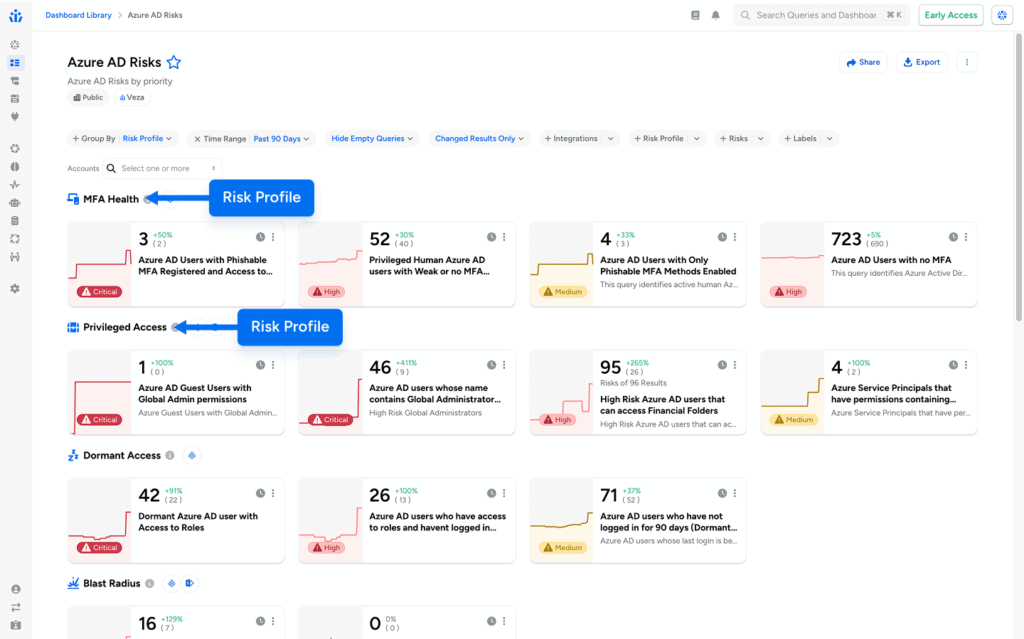
We organize authorization risks into seven core Risk Profiles that help teams classify findings by risk domain and consistently prioritize remediation. In the enhanced Risks experience, Veza also defines an additional Informational profile used for counts and inventory, which is not shown on the Risks page.
Going forward, Risk Profiles provide a consistent “language of risk” for organizing and tracking risk queries across the Risks experience and dashboards, so that teams can measure posture and progress by risk domain, not just by tool or integration.
The 7 Risk Profiles:
- MFA Health: Detects MFA implementation and enforcement risks, including identities without MFA enabled, weak MFA configurations, or MFA bypass conditions.
- Privileged Access: Identifies excessive or unnecessarily high-impact privileges, such as over-permissioned accounts, unused administrative access, and privilege accumulation risk.
- Blast Radius: Measures the scope of potential impact if an identity is compromised, helping teams understand potential damage from unauthorized access to an identity or resource.
- Dormant Access: Finds inactive identities that retain access permissions, meaning accounts that have not been used recently but still have assigned permissions.
- Orphaned Access: Detects accounts not linked to a central identity provider or HR system, which can include accounts tied to former employees or contractors.
- Access Risk: Covers known risky authorization patterns that do not fit other categories (a catch-all profile for items that still require attention).
- Identity Hygiene: Identifies IAM best practices and configuration issues, such as naming convention violations, missing metadata, expired credentials, and other identity management concerns.
Streamlined Remediation Campaigns
This framework is designed to align day-to-day triage with your strategic goals. Instead of working a single, unstructured backlog of findings, you can organize risk queries by Risk Profile and run remediation as focused workstreams by risk domain. Risk Profiles are built to standardize how teams classify and prioritize authorization risks, and they enable consistent organization across dashboards.
For example, if your goal is to reduce attack surface, you can focus on Dormant Access and track progress as risks move from Open to Resolved. If you are driving compliance outcomes, prioritizing Identity Hygiene can help you surface configuration and governance gaps early and document progress over time. You can click a Risk Profile card to filter directly into the All Risks view and stay in one workflow from prioritization to action.
3. The Evolved Risk Score: Scaling with Your Complexity
Powering both the New Risks Page and the Veza Risk Framework is the Risk Scoring engine. As environments scale, the hard part is not finding issues. It is prioritizing which identities and resources need attention first, based on the number of risks and the severity of the risks they pose.
Risk scores are calculated for each entity using an algorithm designed to keep scores comparable across all entities in the Access Graph, even when risk signals stack up at enterprise scale.
A Scalable Approach to Prioritization
The scoring model uses logarithmic scaling with diminishing returns to prevent score inflation as an entity matches more risk queries. Each entity starts with a base score determined by its highest risk severity, then additional risks add weighted points, where each additional risk contributes less than the previous one.
Lower-severity risks contribute less when higher-severity risks are present, which helps preserve meaningful separation between “normal risk exposure” and true outliers. The result is a score that stays useful for prioritization as environments grow.
Why this matters: Clearer Signals
This update gives teams clearer triage signals. Even if risk findings are high-volume, the scoring model is designed to keep outliers obvious so operators can focus attention where it reduces exposure the fastest.
- Enhanced Differentiation: Risk levels are assigned to queries, while risk scores are calculated for entities (0 to 100) based on the number and severity of queries they match. That means an entity can appear only in High-level risk queries and still score into the “Critical” display category when multiple High risks accumulate.
- Focus on Impact: With comparable entity scores and clear separation of outliers, teams can direct limited remediation time toward the identities and resources that represent the highest cumulative risk exposure.
Summary: Trusted Data leads to Decisive Action
Veza Risk 2.0 represents the next step in our journey to build the most complete Identity Security platform on the market, with a sharper focus on turning risk signals into operational outcomes.
By refining our scoring logic, introducing structure with Risk Profiles, and unifying the dashboards in a new Risks Page, we are deepening the intelligence we deliver and making it easier to prioritize and act at enterprise scale. These updates help teams leverage the full context of your environment, including permissions, activity, and blast radius, to make proactive decisions that secure your business.
Availability of Risk 2.0
- The new risk scores have been generally available to all our customers since November 2025.
- The new Risks Page and the Risk Profiles are available to customers as Early Access features. To try these features, reach out to Veza customer support.
Want to go deeper?
Read the Access Intelligence Data Sheet to see how teams detect and prioritize identity risk with pre-built risk queries, benchmark your program with the State of Identity & Access Report, or Request a Demo to see the Risk 2.0 workflow end to end.