
How Veza Models Every Bot, Topic, Action, Flow, MCP Server, and Dataverse Role in a Single Access Graph
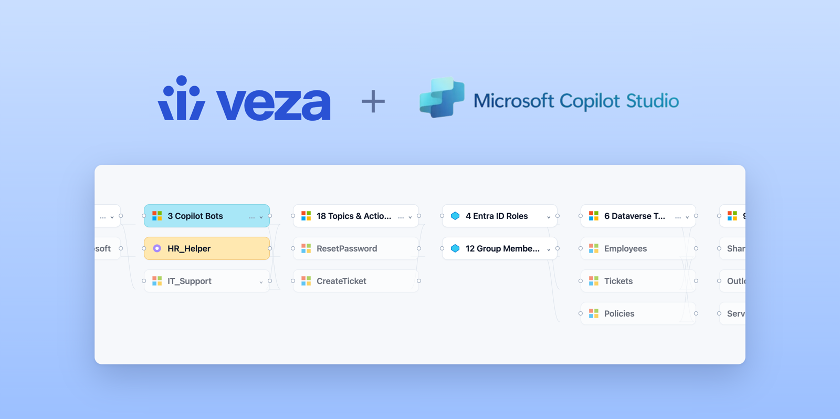
When we launched AI Agent Security for Microsoft Copilot Studio in December, we promised customers one thing: that every bot in their environment would show up in the Access Graph as a first-class identity — with every topic and action it can run, every knowledge source and MCP server it can call, every Power Automate flow it can invoke, and every Dataverse Security Role that governs it traced end-to-end.
Five months in, the most common question we get from Microsoft cloud architects is “show me exactly how it works.” This post is that walkthrough.
Key takeaways
- Every Copilot Studio bot is an identity in the Microsoft cloud. Veza captures it as MicrosoftCopilotStudioBot and classifies it as an AI Agent in the Access Graph.
- Bots are governed through Dataverse Security Roles. Profiles, application users, teams, and security roles all resolve onto bots through BotPermission intermediate nodes.
- Discovery is automatic. If bots are published in the Copilot Studio environment, Veza picks them up — along with their topics, actions, knowledge sources, models, and Dynamics 365 role assignments — on the next extraction.
- Public MCP servers are first-class. When a bot’s actions and external APIs ultimately resolve to a public MCP server, that server is captured in the graph so you can answer “which bots can reach which MCP servers.”
- Inbound and outbound are both modeled. Who can invoke or manage each bot (inbound) and what data, flows, and APIs each bot can reach (outbound) live in the same graph.
Why Copilot Studio Bots Need Identity-First Governance
Microsoft Copilot Studio is where business users build agents on top of Dataverse, wire them into Power Automate flows, attach knowledge sources from SharePoint and Dynamics 365, and connect them to external APIs and public MCP servers. Each bot is an identity in the Microsoft cloud — assigned to security roles, granted to teams, and capable of invoking actions on behalf of whoever is talking to it.
That power is exactly why governance is hard. Bots multiply quickly. Each one accumulates topics, actions, knowledge sources, and external connections. And in most organizations, no one can answer:
Which bots exist, what data and tools can they reach, and which Dynamics 365 users and security roles can invoke them?
That’s the gap Veza closes. For every bot in your Copilot Studio environment, Veza answers the question we were built to answer:
What can take what action on what data — across every AI Agent in Copilot Studio?
A quick clarifier before we go deeper: Microsoft 365 Copilot and Microsoft Copilot Studio are not the same thing. M365 Copilot is the productivity assistant; Copilot Studio is the maker platform where bots are built and deployed. This post is about the latter.
What Veza Discovers in Copilot Studio
Veza extends the existing Microsoft integration to model the full Copilot Studio object graph as it lives in Dataverse, plus the Dynamics 365 identities that govern it. Discovery is automatic — if bots are published in the environment, Veza picks them up on the next extraction.
The following entities and relationships are visible:
- Copilot Studio Bots — every conversational agent stored in Dataverse, captured as MicrosoftCopilotStudioBot and classified as an AI Agent
- Topics — conversation flows and dialogs, captured as MicrosoftCopilotStudioTopic
- Actions — external integrations and Power Automate flow invocations, captured as MicrosoftCopilotStudioAction
- Knowledge Sources — connected data sources backing bot responses, captured as MicrosoftCopilotStudioKnowledgeSource
- Custom GPTs — AI-powered components with their own configurable model, captured as MicrosoftCopilotStudioCustomGPT
- External APIs and Power Automate Flows — third-party connectors and workflow automations, captured as MicrosoftCopilotStudioExternalAPI and MicrosoftCopilotStudioPowerAutomateFlow
- AI Models — the underlying LLMs (GPT-4o, Claude Sonnet, and others) bound to each bot, captured as MicrosoftCopilotStudioAIModel
- Capabilities — bot-level toggles such as Web Browsing and File Upload, captured as MicrosoftCopilotStudioCapability
- Bot Permissions — MicrosoftCopilotStudioBotPermission intermediate nodes that connect Dynamics 365 identities to bots through Security Role assignments
- Public MCP servers — MicrosoftCopilotStudioPublicMCPServer entities the bot can ultimately reach through its actions and external API connections
A Worked Example: A Customer Service Bot Reaching Across Dataverse, SharePoint, and an MCP Server
Picture a Copilot Studio bot named customer-service-bot running in production for a B2B SaaS company:
- It is granted to the Customer Service Rep Dataverse Security Role and the Tier 2 Escalation Team
- It uses an Application User to invoke a Power Automate flow that updates the Case table in Dataverse
- It reads from a SharePoint knowledge source containing the support knowledge base
- It calls a public MCP server in the registry to look up shipment status from a logistics provider
- Its underlying AI Model is claude-3-5-sonnet
- It has Web Browsing enabled but File Upload disabled
- 412 Dynamics 365 users across 3 teams can invoke it through the live chat channel
Before Veza, surfacing all of that meant pulling Dataverse role assignments, Power Automate connection details, knowledge source configs, and the bot’s AI Model setting from four different consoles — and even then, no one could traverse it. With Veza, a security architect opens the Access Graph, types “show me which bots are wired to public MCP servers and which Dataverse records they can reach,” and gets the answer in one query.
That’s the difference identity-first modeling makes for AI agents on Microsoft Cloud.
Answering Critical Security Questions
How do I see what a Copilot Studio bot can actually reach?
Copilot Studio bots do not hold permissions directly. They are governed through Dataverse Security Roles, and they reach outward through the actions, flows, knowledge sources, and APIs they are configured to call. Veza models all of it:
Copilot Studio Bot → HAS_ACTION → Action → CAN_CALL → External API → MAPS_TO_MCP_SERVER → Public MCP Server
→ READS_FROM → Knowledge Source
→ INVOKES → Power Automate Flow
→ USES_MODEL → AI Model
Questions answered in a single query:
- Which bots invoke Power Automate flows that touch SharePoint, Exchange, or Dynamics 365 records?
- Which bots can reach public MCP servers through their actions and external APIs?
- Which bots have Web Browsing or File Upload capabilities enabled — and should they?
- Which bots use which underlying LLM, and are any using a model that falls outside approved policy?
Who can invoke or manage these bots?
In Copilot Studio, the right to invoke or edit a bot flows through Dynamics 365 Security Roles. Veza wires those role assignments into the graph through BotPermission intermediate nodes:
Dynamics 365 User / App User / Team → ASSIGNED_ROLE → Security Role
→ BotPermission → Copilot Studio Bot
Questions answered:
- Who in the organization can invoke each bot — including application users and teams, not just named users?
- Which bots are exposed to broad Security Roles versus locked down to specific teams?
- When a Dynamics 365 user changes role, which bots do they lose — or retain — the ability to invoke?
- Which bots have Application Users (non-human callers) attached, and what can those App Users actually reach?
What models, tools, and MCP servers are running under the hood?
The model and tool layers are where Copilot Studio risk most often hides — a bot is only as safe as the LLM it calls and the connectors it is wired to. Veza captures both:
- Which underlying AI Models are configured on each bot, including non-Microsoft models such as Claude Sonnet?
- Which Custom GPTs exist in the environment, and what model and instructions back each one?
- Which External APIs and Power Automate flows are wired into each bot, and where do those flows ultimately deliver data?
- Which public MCP servers are reachable from your environment, and through which bots and external APIs?
What This Unlocks for Security and IAM Teams
For every Copilot Studio bot, Veza surfaces:
- The bot and the AI model that powers it
- The Dynamics 365 users, application users, teams, and security roles that can invoke or manage it
- The topics, actions, knowledge sources, custom GPTs, external APIs, and flows it is configured to use
- The public MCP servers it can reach through its actions and external APIs
- The capabilities — Web Browsing, File Upload, and others — that are enabled on it
That visibility plugs into everything Veza already does:
- Access Reviews — bots become reviewable entities alongside humans, application users, and service principals
- Blast Radius — over-privileged bots surface against the same risk model as any other identity in the Microsoft cloud
- Rules & Alerts — trigger on a new bot without an owner, a bot newly granted to a broad Security Role, a bot wired to a previously unseen public MCP server, or a bot quietly switched to a non-approved model
- Access Graph search — natural-language and graph queries traverse the full chain from a Dynamics 365 user to a bot to a knowledge source to the underlying record
Compliance teams care because this maps directly to SOX, HIPAA, GDPR, and ISO 27001 requirements for audit-ready evidence on AI-driven access in regulated industries — particularly important as Copilot Studio adoption accelerates in healthcare and financial services.
Frequently Asked Questions
Do I need a new connector to enable Veza for Copilot Studio? No. If you already have the Veza Microsoft integration in place, Copilot Studio discovery is automatic on the next extraction. There’s no separate connector, no additional datasource, and no agent runtime to deploy.
Does Veza distinguish Microsoft 365 Copilot from Copilot Studio bots? Yes. This integration is scoped to bots built and published in Copilot Studio — the maker platform — and the Dataverse identities that govern them, which is where the highest-risk custom agents live.
How does Veza handle Application Users (non-human callers) on a bot? Application Users are captured as identities in the Access Graph and connected to the bots they invoke through the same BotPermission model. So you can answer “which non-human callers can invoke this bot” and “what can each of those callers reach” without a separate workflow.
Does Veza model public MCP servers reachable from Copilot Studio bots? Yes. MicrosoftCopilotStudioPublicMCPServer entities surface in the graph, connected to bots through the chain of actions and external APIs that ultimately resolve to them. Rules can fire when a bot is newly connected to an MCP server that hasn’t been seen before.
Can I run access reviews on Copilot Studio bots the same way I do for human users? Yes. Bots become reviewable entities in Veza Access Reviews, with the same campaign cadence, reviewer assignment, and risk-based prioritization you already use for humans, service principals, and application users.
Does Veza alert when a bot is quietly switched to a non-approved AI model? Yes. Rules & Alerts can trigger on model changes, on bots configured with a model that falls outside approved policy, or on bots with Web Browsing or File Upload capabilities enabled when they shouldn’t be.
Getting Started
Veza AI Agent Security for Microsoft Copilot Studio is generally available for existing Microsoft integrations. Once bots are published in the Copilot Studio environment, Veza picks up bots, topics, actions, knowledge sources, models, and Dynamics 365 role assignments on the next extraction.
- Existing Veza for Microsoft customers — reach out to your account team to confirm enablement.
- New customers — request a demo to see the full Access Graph in action, including a live walkthrough of a Copilot Studio bot traced from a Dynamics 365 user to a Dataverse record.
- Want to go deeper? Read the Veza AI Agent Security overview and the Veza for Microsoft solution brief.
Related Reading
Veza Expands AI Agent Security to Azure AI Foundry (launch blog)
Inside Veza’s AI Agent Security for Amazon Bedrock Agents (deep dive)
Inside Veza’s AI Agent Security for Google Cloud Vertex AI (deep dive)
Inside Veza’s AI Agent Security for Salesforce Agentforce and Einstein Bots (deep dive)