
Overview: Streamlining Access Requests
Many organizations struggle to automate access requests because of fragmented identity data. Current solutions often force a choice between efficient processes and rigorous security.
Veza’s APIs solve this by unifying your data, allowing you to automate access at scale without lowering your governance standards.
The Solution: Veza + ServiceNow Integration
We built an integration that combines Veza’s Identity Authorization Platform with ServiceNow’s IT Service Management capabilities to create a seamless, automated access request workflow.
The outcome? Users can request access to multiple resources through a familiar catalog interface, IT admins and/or managers can approve with one click, and access is automatically provisioned—all while maintaining a complete audit trail.
Architecture Overview
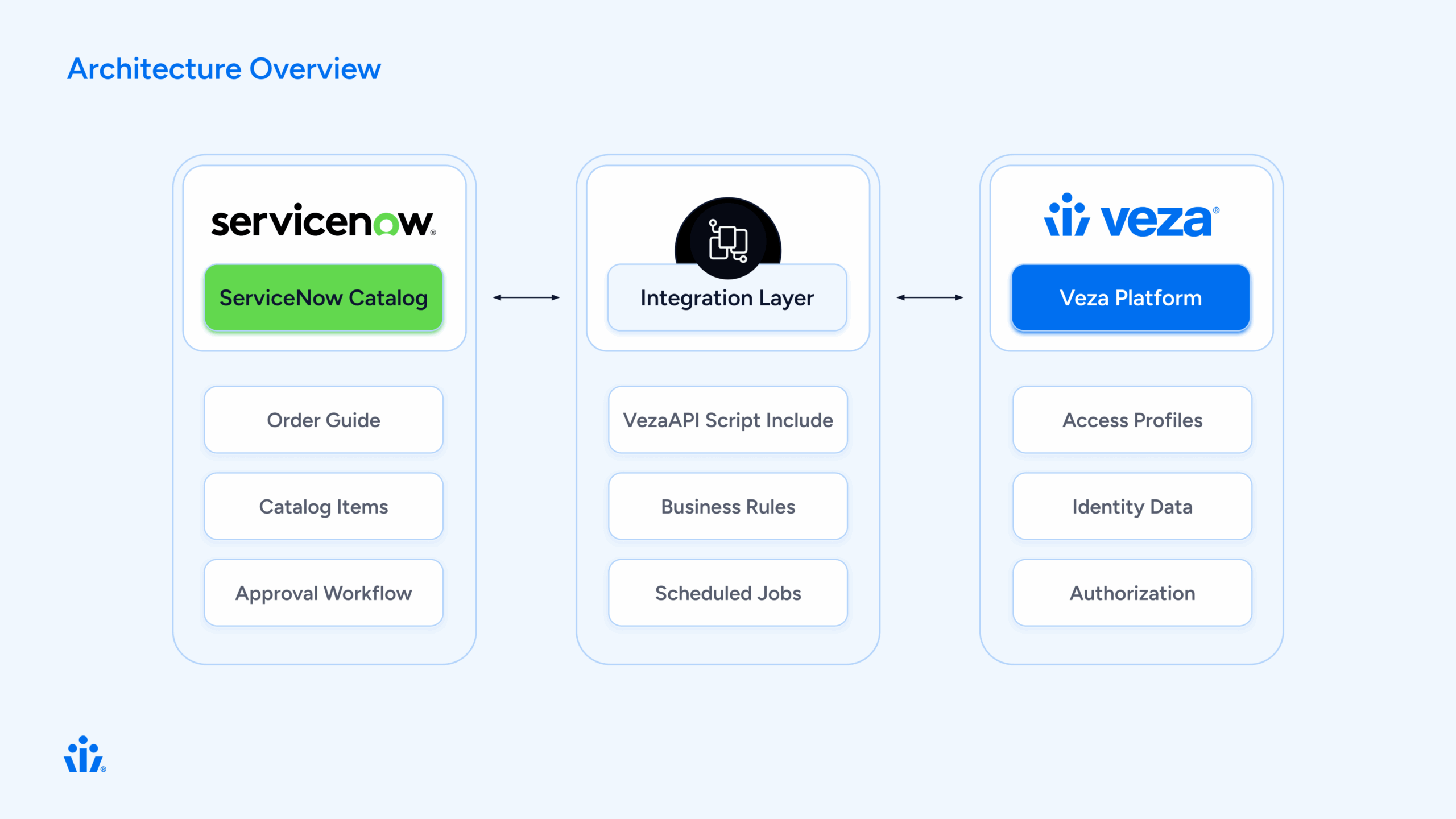
The Components
Our integration consists of five key components:
How It Works: The User Journey
Let’s walk through a typical access request from start to finish.
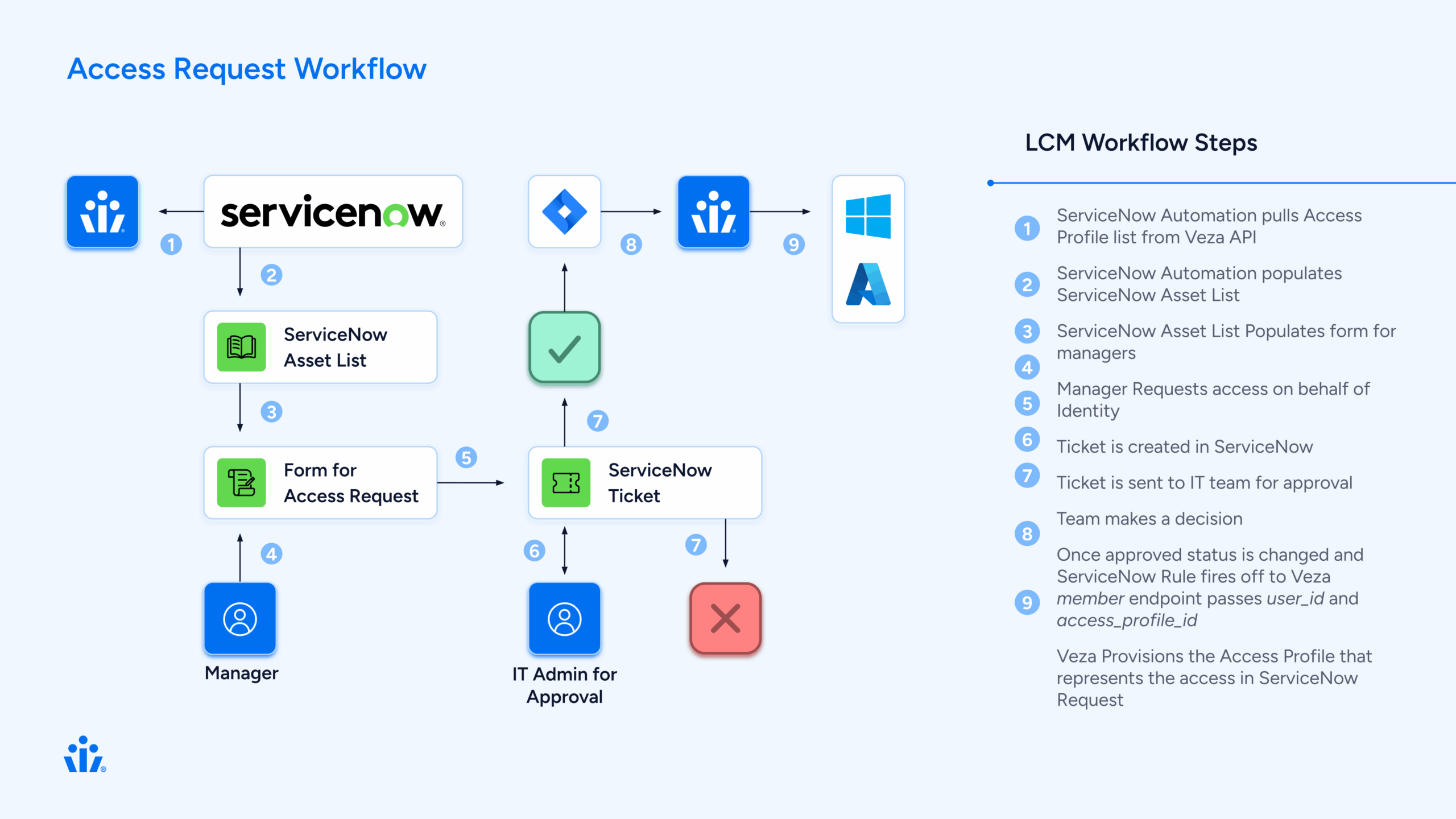
Step 1: User Requests Access
Sarah, a new data analyst, needs access to several shared drives and applications to do her job.
Behind the scenes
ServiceNow creates three separate Requested Items (RITMs), one for each profile. Each RITM will follow the same approval workflow independently.
Step 2: Manager Approval
David, Sarah’s manager, receives an approval notification in ServiceNow. He can:
- Review the request details
- See the business justification
- Approve or reject each profile individually
Behind the scenes
A business rule (Veza Create Manager Approval) automatically created the approval record when the RITM was created. The approval is linked to Sarah’s manager from her user profile in ServiceNow.
Step 3: IT Review (Optional)
For sensitive access profiles, an IT task is created after manager approval:
- IT staff reviews the request
- Verifies the user’s need for access
- Completes the task
Behind the scenes
Another business rule (Veza Create IT Task) creates the IT task when the manager approves. This step is optional and can be configured per profile.
Step 4: Admin Approval
For high-privilege access, an admin provides final approval:
- Security admin reviews the complete request chain
- Sees manager and IT approvals
- Makes final decision
Behind the scenes
The admin approval is created automatically when the IT task is completed.
Step 5: Automatic Provisioning
This is where the magic happens. When all approvals are complete:
The business rule triggers:
// Veza Access Grant Handler triggers on IT task close
1. Get the RITM associated with the task
2. Extract the veza_profile_id from the RITM variables
3. Look up Sarahs identity in Veza
4. Call Veza API: addMembersToAccessProfile()
5. Veza adds Sarah to the access profile
6. Veza syncs to downstream systems (AD, AWS, etc.)
7. Update RITM: "Access granted successfully"
Within minutes, Sarah has access to all three systems she requested. No manual work required.
Step 6: Confirmation
Sarah receives a notification:
“Your access request has been fulfilled. You now have access to Data Analytics – Shared Drive.”
The RITM closes with complete audit trail:
 Who requested
- Who approved (and when)
- What access was granted
- When provisioning occurred
Technical Deep Dive
⚙️ Component 1: VezaAPI Script Include
This is the heart of the integration—a JavaScript class that wraps the Veza REST API.
Key Methods:
var VezaAPI = Class.create();
VezaAPI.prototype = {
    initialize: function() {
        this.baseUrl = gs.getProperty('veza.api.url');
        this.apiToken = gs.getProperty('veza.api.token');
    },

    // Get all access profiles from Veza
    getAccessProfiles: function() {
        var endpoint = '/api/private/lifecycle_management/access_profiles';
        return this._makeRequest('GET', endpoint);
    },

    // Look up a user by email
    getUserByEmail: function(email) {
        var response = this.getIdentities();
        // Search through identities to find matching email
        // Return user ID if found
    },

    // Add user to access profile
    addMembersToAccessProfile: function(profileId, userIds) {
        var endpoint = '/api/private/lifecycle_management/access_profiles/'
                      + profileId + '/versions/1/members';
        var payload = {
            access_profile_id: profileId,
            identity_ids: userIds,
            type: 'ADD',
            version_number: 1
        };
        return this._makeRequest('PUT', endpoint, payload);
    }
};
What makes it robust:
- Proper error handling with try/catch
- Consistent response format: {success, status, data, error}
- Configurable via system properties (no hardcoded credentials)
- Debug logging for troubleshooting
⚙️ Component 2: Catalog Sync
The catalog sync process keeps ServiceNow in sync with Veza’s access profiles.
The sync script:
function syncVezaCatalogItems() {
    // 1. Connect to Veza
    var vezaAPI = new VezaAPI();
    var response = vezaAPI.getAccessProfiles();

    // 2. For each profile from Veza
    for (var i = 0; i < profiles.length; i++) {
        var profile = profiles[i];

        // 3. Create or update catalog item
        var grItem = new GlideRecord('sc_cat_item');
        grItem.name = profile.name;
        grItem.category = 'Veza Access Profiles';
        grItem.insert();

        // 4. Create variables
        // Variable 1: business_justification (user input)
        // Variable 2: veza_profile_id (hidden, from Veza)
    }
}
Scheduled to run daily, this ensures:
- New Veza profiles appear in ServiceNow automatically
- Updated descriptions sync from Veza
- Decommissioned profiles can be marked inactive
⚙️ Component 3: Approval Workflow
One of the trickiest parts of the integration was getting the approval workflow right. There were many iterations using multiple flows but we were able to distill the process into one buisness rule.
The Solution: Keep only ONE business rule that creates approvals.
// Veza Create Manager Approval (order 50)
(function executeRule(current, previous) {
    // Only run for Veza catalog items
    if (!isVezaAccessRequest(current)) return;

    // Create manager approval
    var grApproval = new GlideRecord('sysapproval_approver');
    grApproval.sysapproval = current.sys_id;
    grApproval.approver = current.request.requested_for.manager;
    grApproval.state = 'requested';
    grApproval.insert();
})(current, previous);
Key insight: Disable all other approval-creating business rules to prevent duplicates. Each RITM should have exactly 1 approval, not 2, not 0.
⚙️ Component 4: Access Provisioning
The final piece: actually granting access in Veza when approvals complete.
// Veza Access Grant Handler
// Triggers: After IT task is closed complete
(function executeRule(current, previous) {
    // 1. Verify task was approved
    if (current.state != 3 || current.approval != 'approved') return;

    // 2. Get the RITM
    var grRITM = new GlideRecord('sc_req_item');
    grRITM.get(current.request_item);

    // 3. Get Veza profile ID from RITM variables
    var profileId = getVariable(grRITM, 'veza_profile_id');

    // 4. Look up user in Veza
    var userEmail = grRITM.request.requested_for.email;
    var vezaUserId = getVezaUserId(userEmail);

    // 5. Grant access via Veza API
    var vezaAPI = new VezaAPI();
    var result = vezaAPI.addMembersToAccessProfile(profileId, [vezaUserId]);

    // 6. Update RITM
    if (result.success) {
        grRITM.state = 3; // Closed Complete
        grRITM.work_notes = 'Access granted successfully in Veza.\n' +
                           'Veza User ID: ' + vezaUserId;
        grRITM.update();
    }
})(current, previous);
What Veza does next:
- Adds user to access profile
- Queues sync actions for downstream systems
- Executes provisioning (add to AD group, AWS role, etc.)
- Returns success confirmation
The Order Guide Approach
We chose to use ServiceNow’s Order Guide feature rather than building a custom spawner. Here’s why:
Order Guide (What we use):
- Native ServiceNow functionality
- Users can select multiple items from a list
- Each selection creates a separate RITM
- Each RITM follows standard approval workflow
- No custom code needed for RITM creation
- Easy to maintain and troubleshoot
The ServiceNow Order Guide gives users a familiar shopping cart experience: browse profiles, add the ones you need, and check out once.
Data Flow: Request to Provisioning
Let’s trace a single request through the entire system:
Initial Request (t=0)
User submits Order Guide with 3 profiles
    ↓
ServiceNow creates 3 RITMs
    ↓
RITM 1: "Data Analytics - Shared Drive"
  Variables:
    - business_justification: "Need access for Q4 reporting"
    - veza_profile_id: "019838eb-fc0e-7797-9bee-ea38534fb7c3"
  State: Open
  Approval: Requested
Manager Approval (t=5 minutes)
Manager approves RITM 1
    ↓
Business Rule: VezaCreateITTask triggers
    ↓
IT Task created for RITM 1
  State: Open
  Assignment: IT Ops group
IT Task Completion (t=30 minutes)
IT staff closes IT task as "Approved"
    ↓
Business Rule: VezaAccessGrantHandler triggers
    ↓
Step 1: Get RITM data
  - Requested for: sarah.jones@company.com
  - Profile ID: 019838eb-fc0e-7797-9bee-ea38534fb7c3
    ↓
Step 2: Look up user in Veza
  - API: GET /api/private/lifecycle_management/identities
  - Find: sarah.jones@company.com
  - Result: Veza User ID = 01982f77-588b-79b7-bd67-bcc6513344dd
    ↓
Step 3: Grant access in Veza
  - API: PUT /access_profiles/{profileId}/versions/1/members
  - Body: {
      access_profile_id: "019838eb...",
      identity_ids: ["01982f77..."],
      type: "ADD",
      version_number: 1
    }
  - Response: 200 OK
    ↓
Step 4: Veza provisions access
  - Veza adds user to access profile
  - Queues sync to Active Directory
  - Adds user to "Data-Analytics-SharedDrive" AD group
  - Group permissions grant access to shared drive
    ↓
Step 5: Update ServiceNow
  - RITM state: Closed Complete
  - Work notes: "Access granted successfully in Veza.\nVeza User ID: 01982f77..."
  - User notified via email
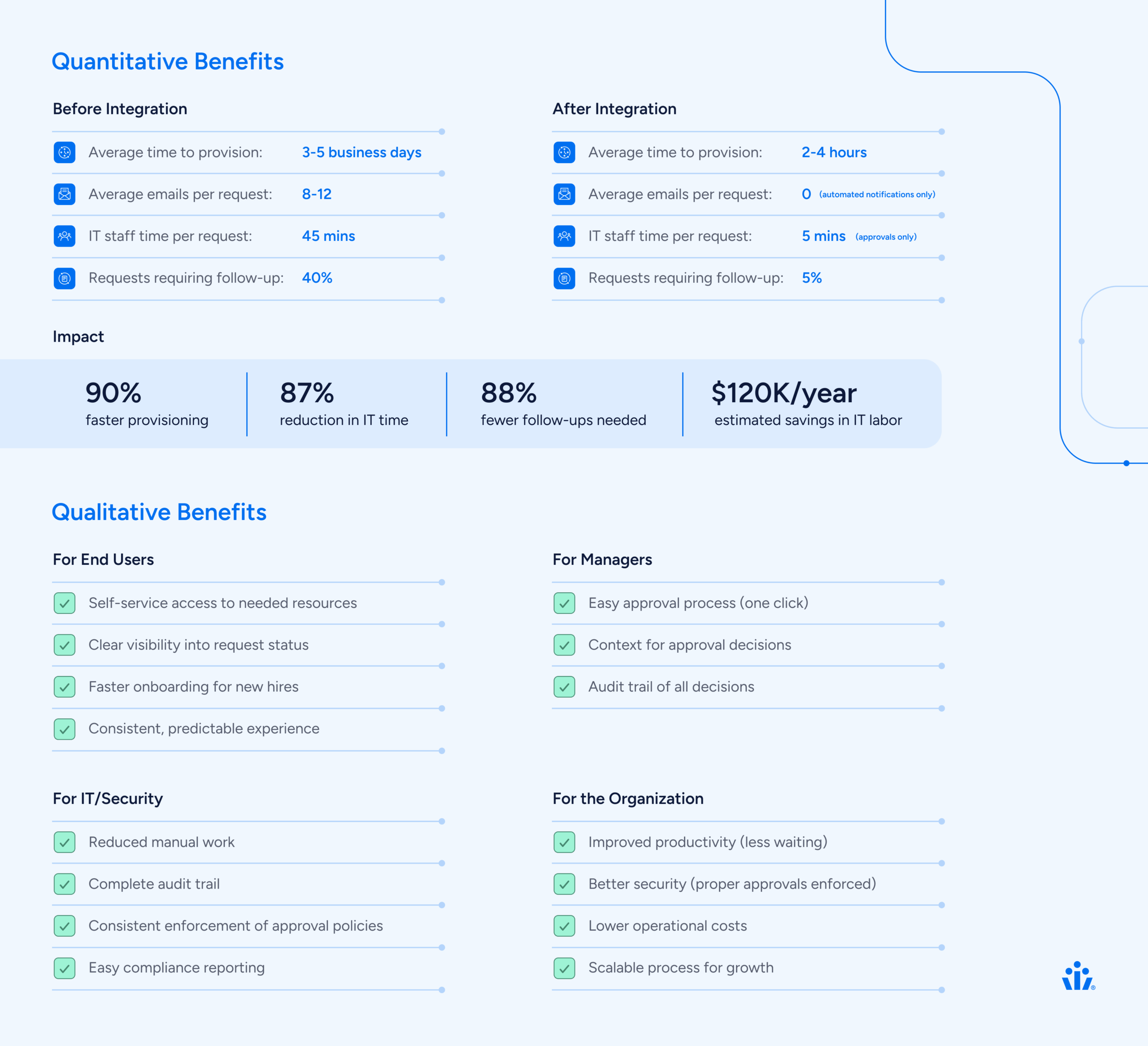
Total time: Under 1 hour (vs. days for manual process)
Key Design Decisions
1. Why Store Profile ID in Variables?
Each catalog item has a hidden variable called veza_profile_id that stores the Veza profile UUID.
Alternatives we considered:
- Store in catalog item custom fields → Harder to access in business rules
- Look up by name → Fragile, names can change
- Hardcode in business rules → Impossible to maintain
Why variables work:
- Automatically copied to each RITM
- Easy to access in business rules
- Can be updated via catalog sync
- Standard ServiceNow pattern
2. Why One Approval Business Rule?
We initially had three business rules creating approvals, resulting in 2-3 approvals per RITM.
The solution: Disable all but one.
Key lesson: ServiceNow business rules run in order. If multiple rules can create approvals, they will. Better to have one well-designed rule than multiple competing ones.
3. Why Trigger on IT/Manager Task Close?
We trigger access provisioning when the IT task closes (not when admin approves).
Reasoning:
- IT/Manager task is the final approval step
- Gives IT or Manager a chance to review before provisioning
- Clear trigger point (state change to “Closed Complete”)
- Easy to modify if approval chain changes
4. Why Not Cache Veza Data?
We call Veza APIs in real-time rather than caching user data in ServiceNow.
Why no cache:
- Always current data (no stale cache)
- Veza is source of truth for identities
- API calls are fast (~200ms)
- Simpler architecture (no cache invalidation)
Trade-off:
Extra API calls, but negligible impact given request volume.
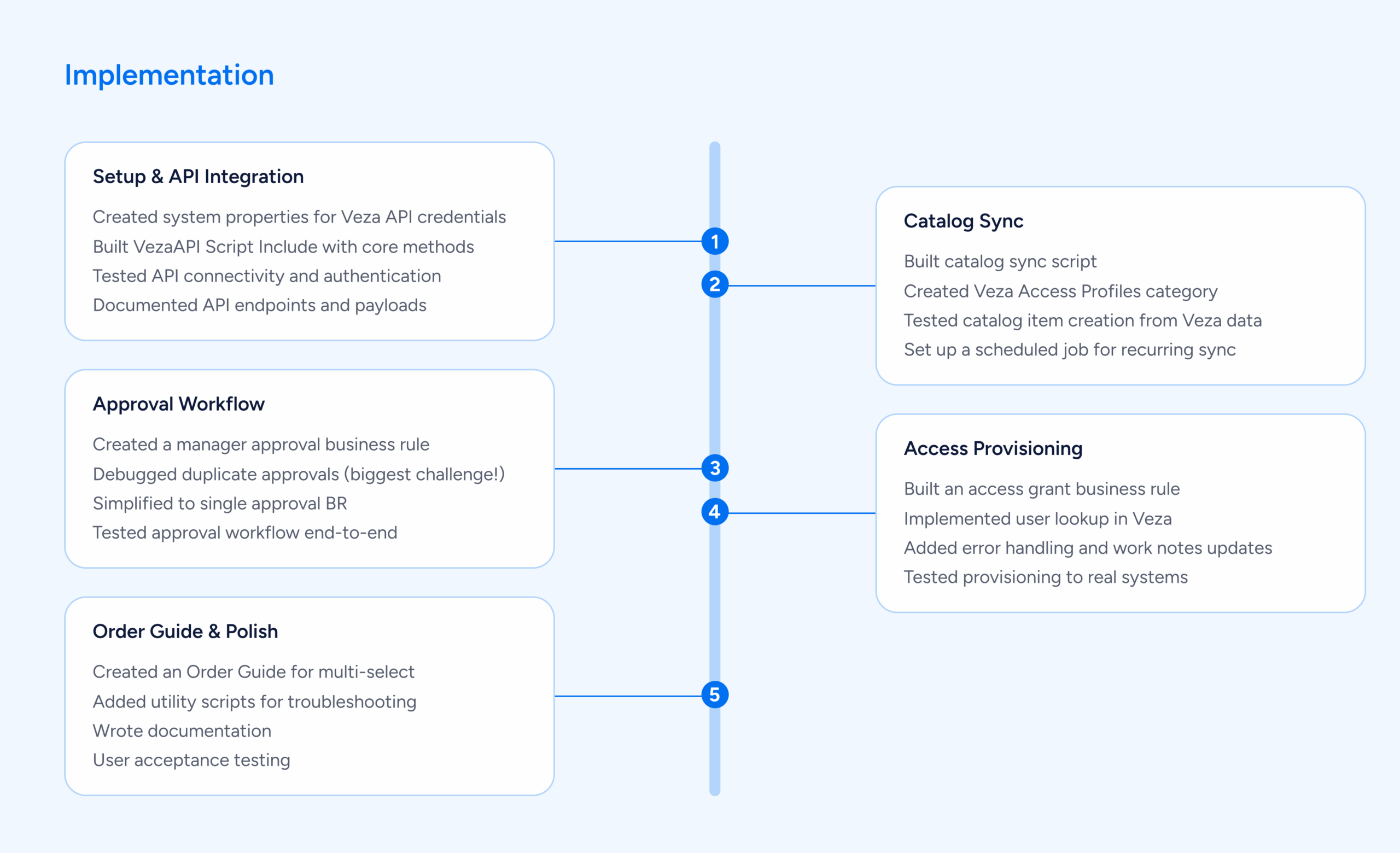
Implementation Timeline
Challenges We Overcame
🚵 Challenge 1: Duplicate Approvals
Problem: Each RITM was getting 2-3 approval records instead of 1.
Root cause: Multiple business rules all thought they should create approvals.
Solution: Disabled all but one approval-creating business rule. Added logging to track which rules were firing.
Lesson: Less is more. One well-designed rule beats multiple competing ones.
🚵 Challenge 2: Variable Access in Business Rules
Problem: Accessing catalog variables from business rules is tricky in ServiceNow.
Variables exist in three tables:
- item_option_new – Variable definition
- sc_item_option – Variable value
- sc_item_option_mtom – Links value to RITM
Solution: Built a helper function that navigates these relationships:
function getVariable(ritm, varName) {
    var grMTOM = new GlideRecord('sc_item_option_mtom');
    grMTOM.addQuery('request_item', ritm.sys_id);
    grMTOM.query();

    while (grMTOM.next()) {
        var grOption = new GlideRecord('item_option_new');
        if (grOption.get(grMTOM.sc_item_option.item_option_new)) {
            if (grOption.name == varName) {
                return grMTOM.sc_item_option.value.toString();
            }
        }
    }
    return null;
}
🚵 Challenge 3: User Identity Mapping
Problem: ServiceNow and Veza might have users with different identifiers.
ServiceNow: john.smith@company.com
Veza: UUID 01982f77-588b-79b7-bd67-bcc6513344dd
Solution: VezaAPI.getUserByEmail() searches Veza identities by email and returns the Veza UUID.
Fallback: If email doesn’t match exactly, we:
- Normalize emails (lowercase, trim)
- Check multiple email fields (email, primary_email, username)
- Log detailed error if user not found
🚵 Challenge 4: API Error Handling
Problem: What if Veza API is down when we try to provision?
Solution: Comprehensive error handling:
try {
    var result = vezaAPI.addMembersToAccessProfile(profileId, [userId]);

    if (result.success) {
        grRITM.state = 3; // Closed Complete
        grRITM.work_notes = 'Access granted successfully';
    } else {
        grRITM.state = 4; // Closed Incomplete
        grRITM.work_notes = 'ERROR: Failed to grant access - ' + result.error;
    }
} catch (ex) {
    grRITM.state = 4; // Closed Incomplete
    grRITM.work_notes = 'ERROR: Exception - ' + ex.message;
}
RITM is marked “Closed Incomplete” so IT can intervene and retry manually.
Results & Benefits
Lessons Learned
1. Start Simple, Iterate
We initially tried to build a complex “spawner” pattern with custom RITM creation logic. This worked but was fragile and hard to maintain.
Better approach: Use native ServiceNow features (Order Guide) whenever possible. Custom code should be a last resort.
2. Logging Is Your Friend
Comprehensive logging made troubleshooting 10x easier:
gs.info('VezaGrant: Processing approved task ' + current.number);
gs.info('VezaGrant: Found profile ID: ' + profileId);
gs.info('VezaGrant: User ID: ' + userId);
gs.info('VezaGrant: API call result: ' + result.success);
Every log statement paid dividends during debugging.
3. Test With Real Data Early
Testing with mock data missed issues we only found with real Veza profiles and real user identities.
Example: Email normalization issues only appeared with production data where some emails had uppercase characters.
4. Documentation Matters
We created three levels of documentation:
- Quick Start – Get running in 30 minutes
- Complete Setup Guide – All details for production deployment
- Architecture Documentation – For future developers
This made handoff to operations smooth and enabled others to maintain the integration.
5. Keep It Maintainable
We went through 100+ diagnostic scripts during development. Before releasing, we:
- Consolidated to 7 essential files
- Deleted all one-off testing scripts
- Organized utilities in a separate folder
- Wrote clear README files
Result
Next developer can understand the entire integration in one hour.
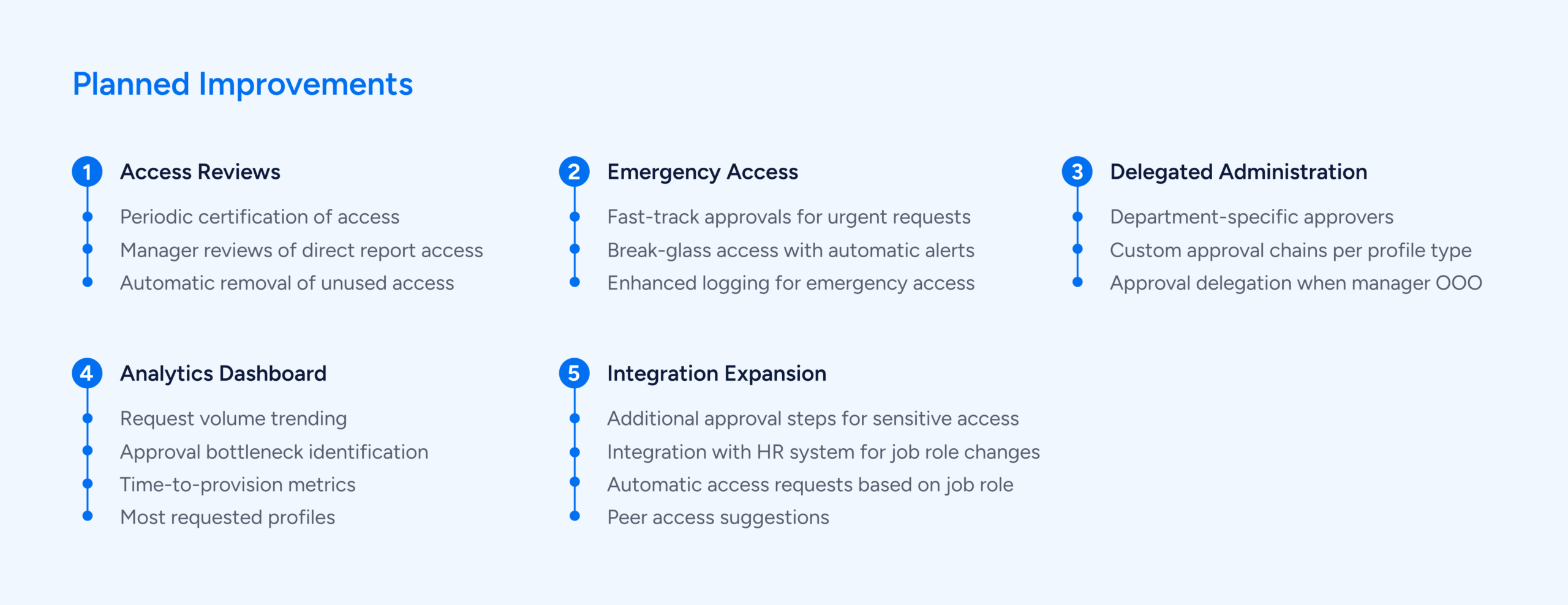
Future Enhancements
Conclusion
Building this Veza-ServiceNow integration transformed our access management process from manual and error-prone to automated and reliable.
The result is a system that serves everyone:
- Users get faster access to the resources they need
- Managers maintain proper oversight without being bottlenecks
- IT/Security enforce policies consistently with less manual work
- The organization becomes more agile and secure
Technical Specifications
Platform Versions:
- ServiceNow: Tokyo release or later
- Veza: Lifecycle Management API v1
Veza API Endpoints Used:
GET /api/private/lifecycle_management/identities

GET /api/private/lifecycle_management/access_profiles

PUT /api/private/lifecycle_management/access_profiles/{id}/versions/1/members
ServiceNow Tables Modified:
sc_cat_item - Catalog items

sc_req_item - Requested items

sc_task - IT tasks

sysapproval_approver - Approvals

item_option_new - Variable definitions
Custom Components:
- 1 Script Include (VezaAPI)
- 3 Business Rules (approvals, IT tasks, access grant)
- 1 Scheduled Job (catalog sync)
- 1 Order Guide
Resources
Veza Documentation: https://docs.veza.com/
ServiceNow Documentation: https://docs.servicenow.com/
Interested in learning more? Contact Support@veza.com